Control Web Activity with URL Filtering

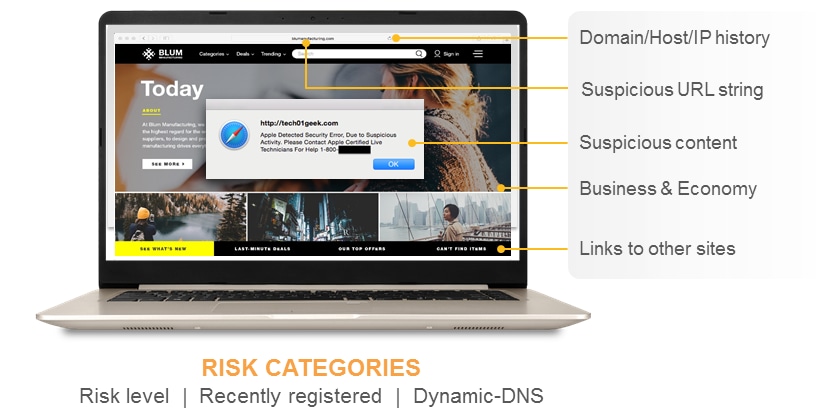
Acting as the perfect complement to policy-based application control provided by App-ID is an on-box URL filtering database that provides control over related web activity. By addressing the lack of visibility and control from both the application and web perspective, enterprises are safeguarded from a full spectrum of legal, regulatory, productivity and resource utilization risks.

On-box URL database maximizes performance and flexibility.

URL filtering is enabled through an on-box, 20 million plus database of URLs, divided across 78 categories. The on-box database ensures maximum, inline performance and minimal latency. Using the combination of application control and URL filtering, flexible policies can be implemented to control employee and network activity.

  • Select from 78 categories and more than 20 million URLs or create a custom list through block lists and allow lists with wildcard support.
  • Specify group-based web browsing policies with user repository integration provided by User-ID.
  • Enable SSL decryption policies by allowing encrypted access to specific web sites such as health, finance and shopping while decrypting traffic to all other sites such as blogs, forums, and entertainment.

Customizable URL database and categories.

To accommodate the rapidly expanding number of URLs, as well as regional and industry-specific URLs, the 20 million on-box URL database can be augmented to suit the traffic patterns of the local user community. If a URL is detected that is not categorized by the local URL database, the firewall can request the category from a cloud-hosted 180 million URL database. The URL is then cached locally in a separate 1 million URL capacity database. In addition to database customization, administrators can create custom URL categories to further tailor the URL controls to suit their specific needs.

Customizable end-user notifications.

Multiple options are available to satisfy the varied requirements for informing end users that they are attempting to visit a web page that does not adhere to corporate policy.

  • Customizable block page: The page informing a user that they are violating policy can include the corporate logo, references to the username, IP address, the URL attempting to be accessed and the category of the URL.
  • URL filtering block and continue: Users accessing a page that potentially violates URL filtering policy, can be presented with a block page "Warning and Continue" button is presented to the user, allowing them to proceed if they feel the site is acceptable.
  • URL filtering override: Requires a user to correctly enter a password in order to bypass the block page and continue surfing.

Flexible, policy-based control over web usage.

As a complement to the application visibility and control enabled by App-ID, URL categories can be used as a match criteria for policies. Instead of creating policies that are limited to either allowing all or blocking all behavior, using URL category as a match criteria allows for exception based behavior, resulting in increased flexibility, yet more granular policy enforcement. Examples of how URL categories can be used in policy include:

  • Identify and allow exceptions to general security policies for users who may belong to multiple groups within Active Directory (e.g., deny access to malware and hacking sites for all users, yet allow access to users that belong to the security group).
  • Allow access to streaming media category, but apply QoS to control bandwidth consumption.
  • Prevent file download/upload for URL categories that represent higher risk (e.g., allow access to unknown sites, but prevent upload/download of executable files from unknown sites to limit malware propagation).
  • Apply SSL decryption policies that allow encrypted access to finance and shopping categories but decrypts and inspects traffic to all other categories.