Why the shift left mantra isn’t enough, and how to build a defense-in-depth strategy that actually works.
In the rush to adopt cloud-native architectures, the security industry fell in love with the simple advice, "Scan everything, everywhere, all the time."
On the surface, it makes sense. Scan your code, your build pipeline, your registry, and your runtime environment. But for many security teams, the checkbox approach has created a new problem — alert fatigue. If the same vulnerability triggers an alert in your IDE, CI pipeline, registry, and runtime, you haven’t improved security. You’ve quadrupled your alerts.
Real container security isn’t about buying a scanner for every stage of the software development lifecycle (SDLC). It’s about understanding the unique security outcome each stage provides and connecting them into a unified defense.
Each section of this post walks through a scanning location, its tradeoffs, and practical examples to help you choose the right approach for each stage of your container lifecycle without drowning in alerts.
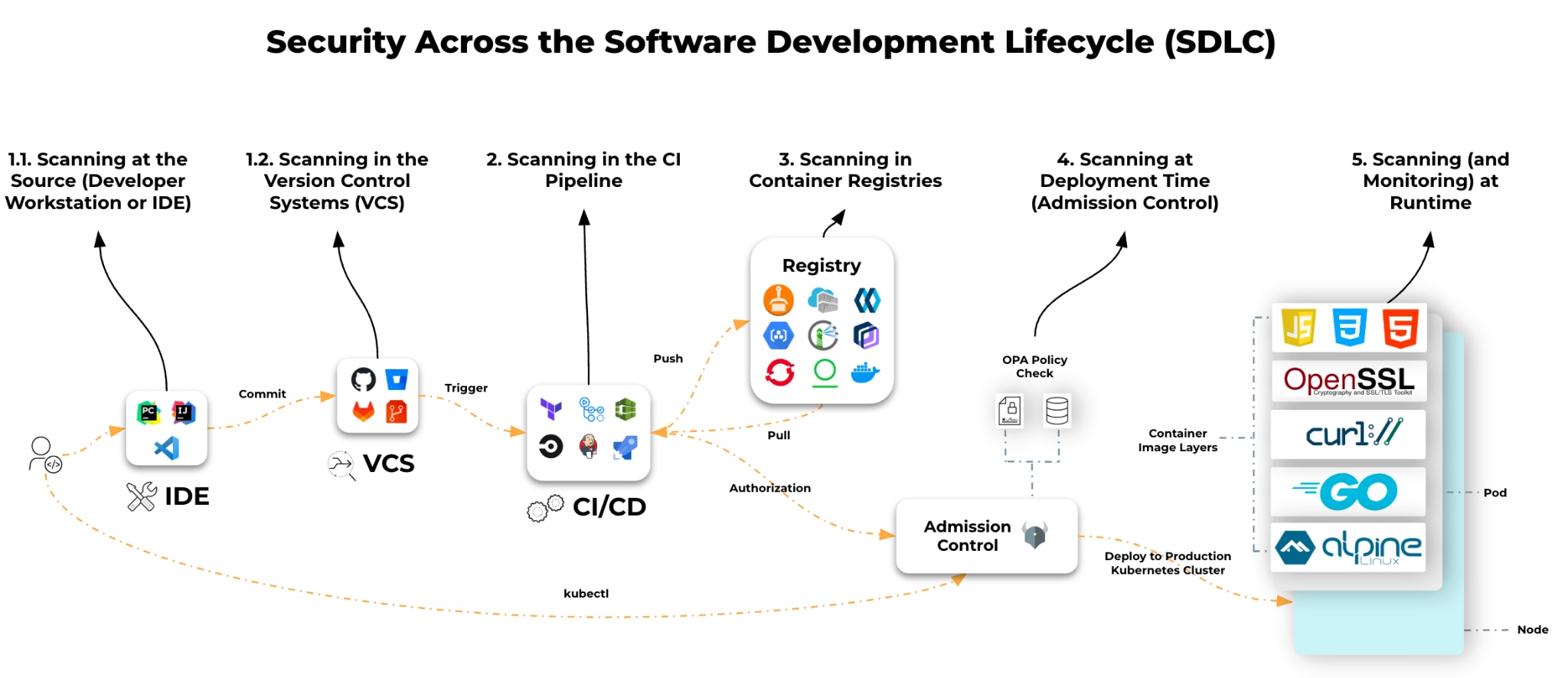
Stopping the Bleeding Before It Starts
Location: Developer Workstation or IDE
Most teams treat workstation scanning as a visibility exercise, a way to let developers know they have bad code. But that's a waste of time. The goal is prevention.
For example, if a developer hardcodes an AWS key or uses a base image from an untrusted public repo, no amount of runtime monitoring will save you. The cheapest, easiest, and fastest place to fix a problem is before the problem leaves the laptop.
The Prevention Approach
- Don’t just lint, block secrets. Use precommit hooks that block secrets from entering Git history. Once a secret is committed, it’s compromised, even if you delete it later.
- Shift context, not just work. Don’t dump a CVE list on your developers. They don’t care about CVE-2023-XYZ. They care that they’re running a deprecated base image. Give them the remediation (e.g., Upgrade to Alpine 3.19), not just the vulnerability data.
Imagine a developer accidentally includes AWS access keys in environment variables. A precommit secret scanner blocks commits before they leak into Git history, helping the team avoid a potential incident.
| Pros | Cons |
|---|---|
|
|
|
|
|
|
|
|
|
Scanning Your Source of Truth
Location: Version Control System (VCS)
VCS scanning introduces collaborative security. Findings surface directly in pull requests (PRs), making security part of the code review process rather than a downstream gate. By scanning your code repos, you get all the benefits of shift-left scanning with minimal setup — actionable, collaborative, and automated feedback built into the developer workflow.
For example, a developer with a non-compliant workstation (no IDE linter or precommit hook configured) creates a PR for a Kubernetes manifest referencing a public container image with known critical CVEs. The VCS scanner annotates the PR, showing vulnerabilities directly in the diff and prompting a fix before merge.
The Collaboration Approach
- Scheduled Scans: Integrate your VCS with a scanning tool to run periodic code scans and keep your codebase vulnerability-free over time.
- Meet Developers Where They Are: Surface real-time feedback directly in the pull/merge request workflow. Developers can see exactly what’s flagged, why it matters, and how to fix it without leaving their existing tools.
| Pros | Cons |
|---|---|
|
|
|
|
|
|
Scanning at Build Time: Enforcing Trust
Location: CI Pipelines
The CI pipeline is often viewed as a quality assurance step, but in a secure environment, it’s your policy enforcement point. At the CI stage, you shift from advising developers to mandating security standards.
A common failure at this stage is the break-the-build mentality. Block every build over a medium severity vulnerability, and developers will simply bypass the scanner. Instead, bring SecOps and DevOps to the table early to align on which policies make sense, that collaboration prevents the pipeline failures breeding developer resentment.
For example, your CI build fails during image scanning because the image contains OpenSSL with a critical CVE. The build doesn’t proceed until the library is updated or the policy is overridden through a formal exception process.
The Enforcement Approach
- Audit Mode Vs. Block Mode: Mature organizations start in Audit Mode (alerting on policy violations without stopping deployment) to baseline their environment. Only shift to Block Mode for Critical vulnerabilities with a known fix available.
- Centralized Security: CI build scans provide centralized, consistent, and enforceable scanning by blocking insecure images before they are pushed to a registry.
| Pros | Cons |
|---|---|
|
|
|
|
|
|
|
The Warehouse: Managing Rot and Data Gravity
Location: Container Registries
Hard truth: A container image that was 100% secure the day you built it can become a critical risk by end of week. Vulnerabilities are discovered daily. Your registry is a staging ground for potential future exploits. Registry scanning gives you continuous visibility.
But there’s a hidden complexity here that most scanning 101 guides miss — data residency.
For example, your image passed CI scans in June, but a major CVE was published in July. The scanner detects this automatically, alerts you, and your security team evaluates whether the workloads running this image must be patched urgently.
The Continuous Monitoring Approach
- Scan In-Place (Data Locality): In a modern cloud architecture, dragging gigabytes of container images across the internet to a central SaaS scanner is slow, expensive (egress costs), and a compliance nightmare. Effective security brings the scanner to the data - spinning up ephemeral scanners in the same region and account where your registry lives.
- Continuous Re-Evaluation: Registry scanning must be continuous. You aren't scanning for bad code you just wrote; you are scanning for new threat intelligence against old code.
| Pros | Cons |
|---|---|
|
|
|
|
|
|
The Last Line of Defense Before Deployment: Admission Control
Say you’ve followed all these best practices, your container images have zero CVEs, and you’re ready to deploy. How do you know the application will deploy correctly? An admission controller validates that the application being deployed follows best practices, even with zero CVEs.
For example, a developer uses a base image from an untrusted source, such as Docker Hub or another public registry, and tries to deploy the application to the production namespace.
The Deployment Gating Approach
- The Admission Controller as the Final Backstop: Your CI pipeline checks the software, but the Kubernetes Admission Controller checks the intent. Use it to enforce operational security — no root containers, no privileged escalation, must be trusted and signed. Doing so will ensure that even if a bad image slips through CI, it can’t actually run.
- Audit Mode Vs. Block Mode: Mature organizations start in Audit Mode (alerting on policy violations without stopping deployment) to baseline their environment. Only shift to block mode for critical vulnerabilities with a known fix available.
- Trust Enforcer: Use an admission controller to enforce which registries are trusted sources for your container images, preventing unvetted images from reaching production.
| Pros | Cons |
|---|---|
|
|
|
|
|
|
The Reality Check: Runtime Protection
Location: Live Production Environments
Runtime protection is the most misunderstood area of container security. The idea that you need to install a heavy agent inside every container just to see what vulnerabilities are running is myth.
Modern cloud architecture allows for agentless visibility. By taking snapshots of the underlying storage volumes (even for running containers), you can detect vulnerabilities, malware, and secrets without touching the live workload or impacting performance. Remember, though, visibility isn’t security.
The Detection and Response Approach
- Agentless for Visibility: Use snapshot-based scanning to get a complete bill of materials (SBOM) of what is running. It’s frictionless, requires no sidecars, and covers 100% of your estate instantly.
- Agents for Action: You can’t stop a live attack with a snapshot. If an attacker spawns a reverse shell or tries to modify a system file, you need an agent to intervene and kill the process.
- Don't Ignore Persistent Storage: Containers are often ephemeral, but their data isn't. Ensure your strategy scans the persistent volumes attached to your workloads, not just the container images.
Choosing the Right Approach: A Practical Framework
| STAGE | WHAT IT PROTECTS | BEST FOR | NOT GOOD FOR |
|---|---|---|---|
| Workstation / IDE | Developer mistakes | Fast feedback | Enforcement |
| Version Control System (VCS) | Developer mistakes | Fast feedback | Predeployment validation |
| CI Pipeline | Build-time vulnerabilities | Blocking insecure builds | Detecting new CVEs later |
| Registry | Continuous scanning | Monitoring new CVEs | Preventing deploys |
| Admission Control | Deployment-time security/validation | Enforcing org policies | Finding vulnerabilities |
| Runtime | Active threats | Detecting attacks | Predeployment validation |
A true defense-in-depth approach requires all of these layers working together.
The Missing Link: Context Is King
Run all these scanners in isolation and you’ll end up with a dashboard showing 10,000 vulnerabilities.
The difference between a noisy security program and an effective one is context.
- Visibility tells you, You have a high-severity vulnerability in library-xyz.
- Security tells you, This vulnerability is in a container running on an internet-facing production workload, and the vulnerable function is actually being executed.
That’s the alert worth waking up for. The other 9,999 can wait.
Final Thoughts
Container image security is an ecosystem of checkpoints across the SDLC:
- Developers catch issues early.
- VCS integration continuously scans code and blocks PRs.
- CI enforces policy.
- Continuous registry scanning for new vulnerabilities.
- Kubernetes blocks deployments that don’t meet requirements.
- Runtime tools detect active threats and behavioral anomalies.
The defense-in-depth model builds resilience against known CVEs, as well as unknown threats and human error.
If you're building or improving your container security strategy, choose scanning locations based on coverage, speed, and enforcement.
For maximum coverage, an integrated solution is essential. Without one, the same vulnerability gets reported multiple times across your toolchain. That’s noise, not security.
Cortex CloudTM reduces that noise by connecting the dots across your entire SDLC, giving you a single, unified view that traces a vulnerability from its origin in a GitHub repository through the image build, into the registry, and all the way to the internet-facing workload running it in production. Sign up for a demo to see it in action.