Securing the modern workspace can be complex, because a surge of web, SaaS, GenAI, and private apps expands activity beyond the reach of traditional inline security controls. These gaps increase the risk of sensitive data exposure while leaving critical user activity outside the visibility of security teams.
Read this blog to see how we’ve integrated Prisma Browser with NGFW to secure your organization across all layers with unique capabilities like:
- Secure remote access from unmanaged devices.
- Unique and robust identification of Prisma Browser traffic for rule targeting.
- Enabling new use cases, like enforcing Prisma Browser use on-campus.
- Reusing existing policies across the platform to ease operations.
Securing the Modern Workspace Is Complicated
The foundation of security in the organization starts at the network layer. This includes securing your endpoints, data centers, branch campuses, and on-premises devices. In this foundational layer, all network activity can be inspected and secured with traditional security tools.
But the workspace has transformed. Web and SaaS apps entered the picture and their adoption is skyrocketing. More user activity and data now extend beyond the network layer. More data now lives on the user’s device and within applications, making inspection and security harder. Decryption is now required to inspect and secure the traffic coming from these apps, but it is not always possible due to factors like new protocols, compliance requirements, SLA considerations, and operational constraints.
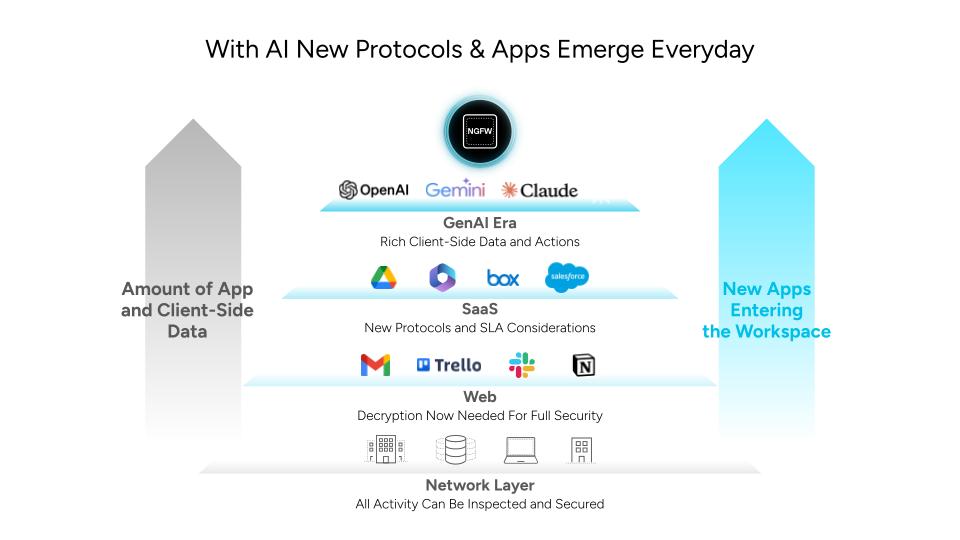
Figure 1. New apps make security harder with increasing client-side data, protocols, and SLA considerations
The Emerging AI Era Is Upending How Security Is Done
The architecture of the workspace today and in the future is increasingly driven by AI, reshaping how organizations need to inspect and secure it. Many user actions within AI apps and agents, like prompting and copy/paste, are outside the inspection capabilities of inline security tools. On top of this, a large volume of the traffic from these AI apps and agents is encrypted. This creates major difficulties in inspecting and securing the new AI-driven workspace.
Furthermore, AI agents and copilots are acting on behalf of the user at the endpoint while assuming the users identities, making it hard to separate AI-generated traffic from human user activity.
The Browser Is a Critical Point to Inspect and Secure
And where do all of these web, SaaS, GenAI and private applications across all layers meet the user?
The browser.
The browser is where users, applications, and data converge. It is the modern workspace, where employees spend 85% of their workday. This makes the browser the most impactful place to secure work. With the proper tools, you can gain visibility into and secure all data-in-use, user activity, and traffic. This is achieved today with Prisma® Browser™— providing visibility and control where the users and data meet, with Palo Alto Network’s best-in-class security engines.
Visibility, Control, and Advanced Security Now Span From the Network to the User With Prisma Browser and NGFW
Prisma Browser and Next-Generation Firewall (NGFW) work together to secure the modern AI workspace from the network to the user. Prisma Browser enhances your organization’s security coverage, complementing NGFW’s advanced network security with full visibility and control over data-in-use, user activity, and agents activity on any device.
With our new integrations between Prisma Browser and NGFW, Palo Alto Networks can now extend protection to unmanaged devices, enforce the use of the secure browser across scenarios, save resources, and improve operations.
Gain Network to Endpoint Visibility
Get full visibility into what users are doing at the endpoint, including data-in-use and user activity across web, SaaS, GenAI, and private apps, even when activity falls outside the coverage of inline network inspection. Because this activity is natively visible in the browser, Prisma Browser can apply security controls directly where users interact with applications and data, eliminating blind spots in an optimal way.
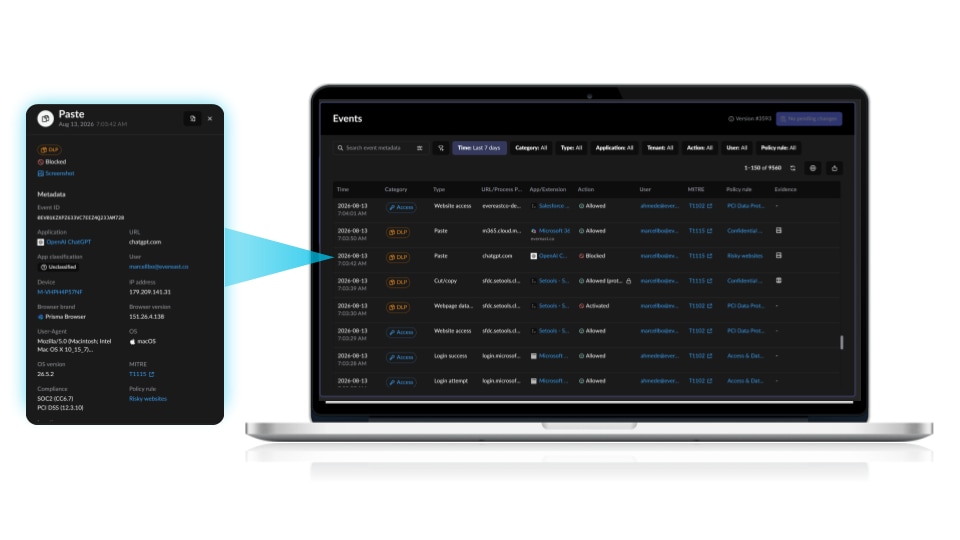
Figure 2. Gain visibility into all user actions in the browser and investigate events
Augment Network Security with Granular Last-Mile Control and Security of All Browser Activity
Beyond providing visibility into every user action across every application, Prisma Browser enables organizations to enforce corporate policies in real time, at the point of interaction, to prevent sensitive data exposure.
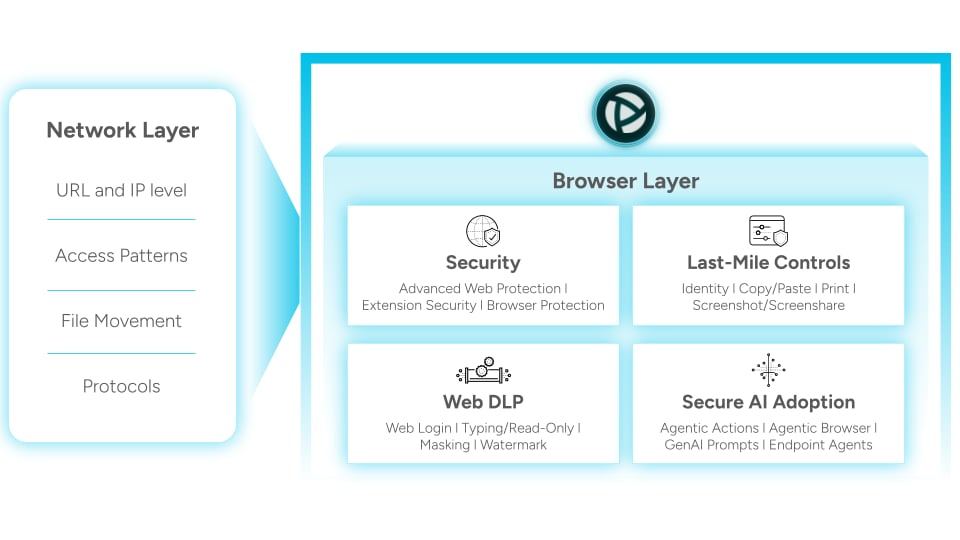
Figure 3. Prisma Browser extends the protective reach of the Palo Alto Networks platform, bringing advanced security and data protection right to where work happens
User actions outside the coverage of inline network inspection, like copy and pasting, printing, screenshotting, typing sensitive data in GenAI prompts,and file movements, can be controlled with granular precision. Browser-native DLP, including data masking, watermarks on sensitive pages, and read-only access, can be applied based on context and risk.
In addition, Prisma Browser offers Advanced Web Protection through its inspection of fully rendered webpages in real time, reimagining the secure web gateway. This unique capability allows catching threats that evade network security controls. Postload attacks and malware assembled in the browser, such as reassembly and AI-driven phishing attacks, are stopped before they can execute or spread.
Finally, agentic workflows are secured in Prisma Browser. AI-generated activity from copilots and agentic browsers can be differentiated from user activity. Guardrails, like blocking access to sensitive data and having users perform multi-factor authentication on agentic actions, can be implemented to keep agentic workflows in control and secure.
Effortlessly Connect Unmanaged Devices to Private Corporate Resources with Prisma Browser Connector
Seamlessly enable work on any device, including personal, third-party, and contactor-used devices, without operational challenges or difficult deployments. Prisma Browser Connector securely connects unmanaged devices to any private network or corporate resources. And if you have NGFW, you can make this connection without opening new ports, deploying additional components, or deploying virtual machines (VMs).
Unlock Unique Capabilities With NGFW-Specific Identification of Prisma Browser Traffic
Prisma Browser is the only browser that can be cryptographically identified by NGFW, allowing its traffic to be distinguished from other browsers.
Organizations can apply policies specifically to Prisma Browser traffic, preventing access to corporate resources from unapproved or unsecured browsers. This allows organizations to reduce resource consumption in the NGFW by enforcing all security policies within Prisma Browser instead of during inline inspection through NGFW. This reduces the need to decrypt browser traffic.
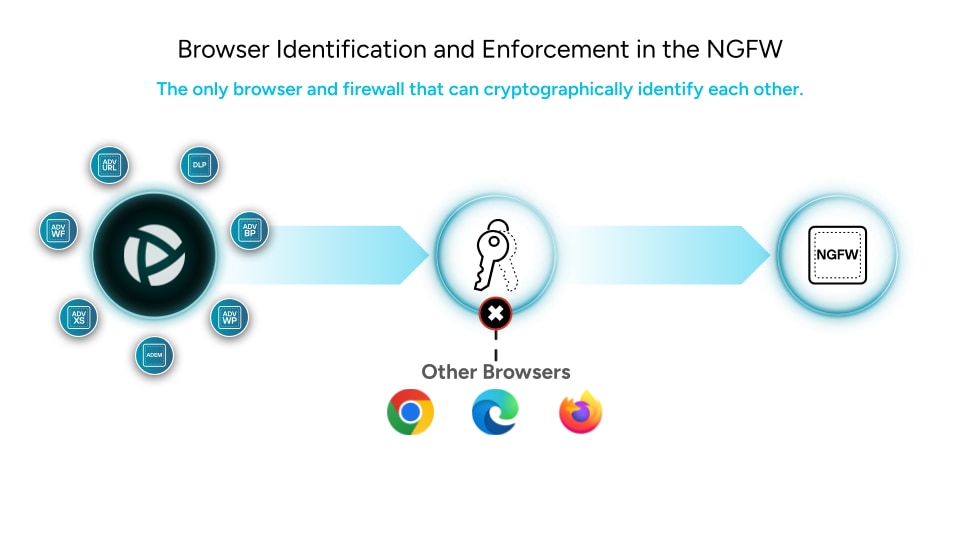
Figure 4. Ensure corporate resources can only be accessed through Prisma Browser.
This unique integration between Prisma Browser and NGFW is a key advantage of the Palo Alto Networks platform, allowing you to better protect on-premises environments, reduce NGFW resource consumption, support new business continuity scenarios, and extend advanced security across all on-campus network access.
Optimize Operations and Simplify Setup With the Platform Approach
Prisma Browser is a part of the Palo Alto Networks platform, bringing browser management into the same pane of glass as NGFW, Prisma Access, and other Palo Alto Networks solutions. Existing policies, like routing policies and Data Loss Prevention profiles, can be reused across the platform for faster implementation and consistent security coverage.
Reporting also falls within a single pane of glass, streamlining operations across the platform. Prisma Browser incidents and events are standardized with reporting across the Palo Alto Networks platform, ensuring faster time to resolution and a more streamlined operational experience.
Leverage the Synergies of Prisma Browser and Next-Gen Firewall For Greater Value
Augment the advanced security of NGFW with the browser-native security, full visibility, and granular controls of Prisma Browser. Adapt your security to the new AI-driven workspace and extend coverage from the network all the way to the endpoint with one single platform that unifies operations across the entire security stack.
See Prisma Browser and NGFW in action. Watch the InterSECt deep dive to learn how you can get greater value with Prisma Browser and NGFW together.