Executive Summary
Adversaries are actively shifting their focus from the endpoint to the SaaS identity layer, transforming platforms like Google Workspace into a primary vector for sophisticated attacks. By leveraging the inherent trust users place in OAuth consent prompts, third-party integrations, and documents, threat actors can bypass conventional security controls to gain initial access, harvest credentials, establish persistence, and exfiltrate data - often without ever touching an endpoint or dropping a single piece of malware.
The April 2026 Vercel incident, which began with a compromised third-party AI tool and pivoted through a Google Workspace account into production infrastructure, proves that security operations must extend their visibility into the heart of the SaaS identity fabric.
To counter this evolving threat, organizations need a security approach that can dissect activity within the Google Workspace itself. SecOps needs the visibility and analytics to detect and respond to attacks that originate and operate within Google Workspace, including by correlating various indicators - from a malicious OAuth consent to credentials harvesting via the Drive API to see the full attack path and eliminate the threat.
Why is Google Workspace the New Primary Target for Enterprise Attacks?
As organizations consolidate their identity, communication, and document workflows into Google Workspace, sophisticated threat actors are taking notice. The platform is no longer just an email and productivity suite, it has emerged as a primary attack surface for initial access, reconnaissance, persistence, and data exfiltration.
The Concentration of Trust
The core of the problem lies in Google Workspace's unique position in the enterprise technology stack. Unlike standalone SaaS applications, Google Workspace unifies critical functions under a single identity:
- Identity Provider (IDP): Gating access to users, groups, and third-party applications.
- Application Authorization: Managing OAuth consent permissions and API tokens.
- Data Repository: Hosting the organization's most sensitive intellectual property and operational data across Gmail, Drive, and Chat.
A single compromised Workspace account doesn't just expose mail and files; it can cascade into every application that trusts Google as the IDP. This concentration of trust is precisely what makes it such an effective target. Users are far more likely to approve a malicious OAuth consent prompt or authorize a rogue integration, if they believe it operates within the vetted corporate environment.
This isn't just speculation. According to Vercel, the April 2026 breach started with a compromised third-party AI tool whose Google Workspace OAuth application had been weaponized, allowing the adversary to pivot directly into the production infrastructure.
The Detection Blind Spot: Living off the Land and API Noise
Detecting these attacks is notoriously difficult because adversaries increasingly rely on "living off the land" (LotL) techniques. They don't drop malware; they abuse legitimate features like OAuth delegations, eDiscovery tools, and file-sharing settings.
Furthermore, the rapid adoption of agentic AI tools and automated workflows has created a massive baseline of legitimate, machine-speed API activity. When service accounts and AI agents are constantly reading emails and accessing files, malicious API abuse blends seamlessly into the operational noise. Traditional security controls focused on endpoints and networks are entirely blind to these SaaS-to-SaaS interactions, leaving security teams searching for a needle in a rapidly expanding haystack.
Anatomy of a Google Workspace Attack Flow: From Initial Access to Data Exfiltration
The following sections walk through a realistic attack kill chain targeting a Google Workspace environment. Each stage was reproduced in a lab environment, the tools and techniques described here are publicly available and actively used by threat actors in the wild.
How Do Adversaries Gain Initial Access to Google Workspace?
An adversary may establish a foothold in the target organization's Google Workspace environment using different techniques. Two of the primary vectors: OAuth consent phishing and credential attacks against legacy accounts.
What is OAuth Consent Phishing and Why is it Persistent?
OAuth consent phishing exploits legitimate authorization flows to manipulate users into granting malicious third-party applications excessive permissions.
It is particularly hard to respond to such attacks as there is no malware, and revoking the session might not be effective, because the adversary will continue again when another attempt is as easy as writing a single prompt.
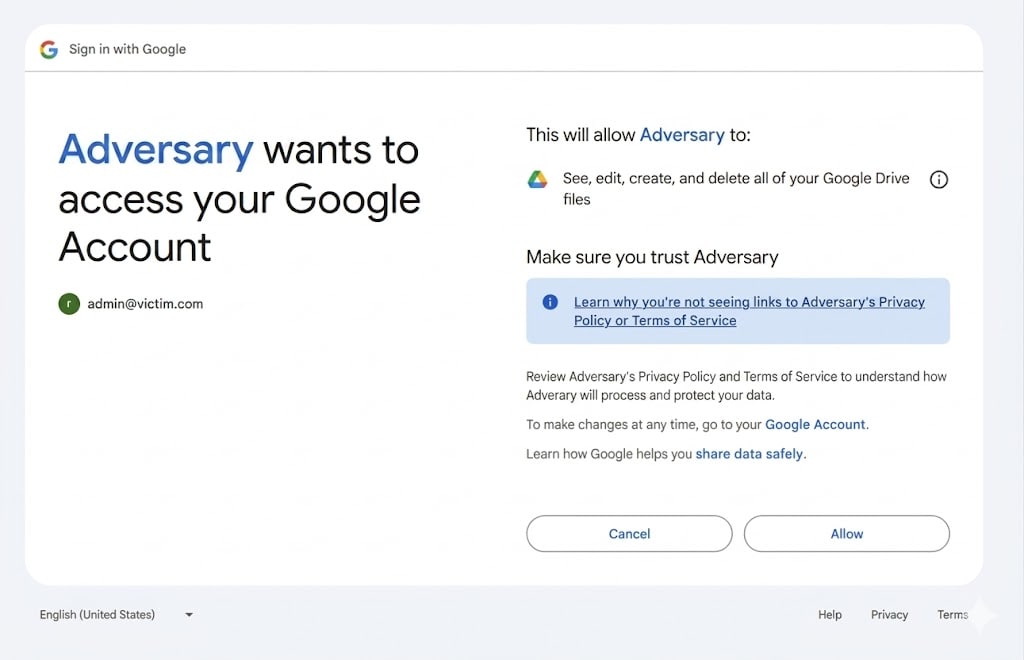
Figure 1. An example of an application consent page that gives full control of the user’s Google Drive.
Password spray
To gain initial access, an adversary might also use credentials attacks such as password spray. Leveraging the fact that many organizations maintain service accounts for automation and integration purposes, or retain legacy user accounts that predate modern security policies. These accounts frequently lack MFA enforcement, may use weak or reused passwords, and often hold broad permissions that were granted during initial setup and never revisited.
Reconnaissance and lateral movement
Credential harvesting
Organizations frequently store sensitive information in shared Drive documents: password spreadsheets, configuration files containing database credentials, API key inventories, and onboarding documents referencing service account credentials. These files are accessible through the Drive API to any identity holding the appropriate OAuth scope.
GD-Thief is an open-source tool that automates this collection. Using a valid OAuth token, GD-Thief calls the Drive 'files.list’ endpoint with 'fullText contains' queries for a list of credential-related keywords, such as 'password', 'api_key', 'secret', and others - and downloads matching files via ‘files.get’. In our lab environment, the full enumeration and download completed in minutes.
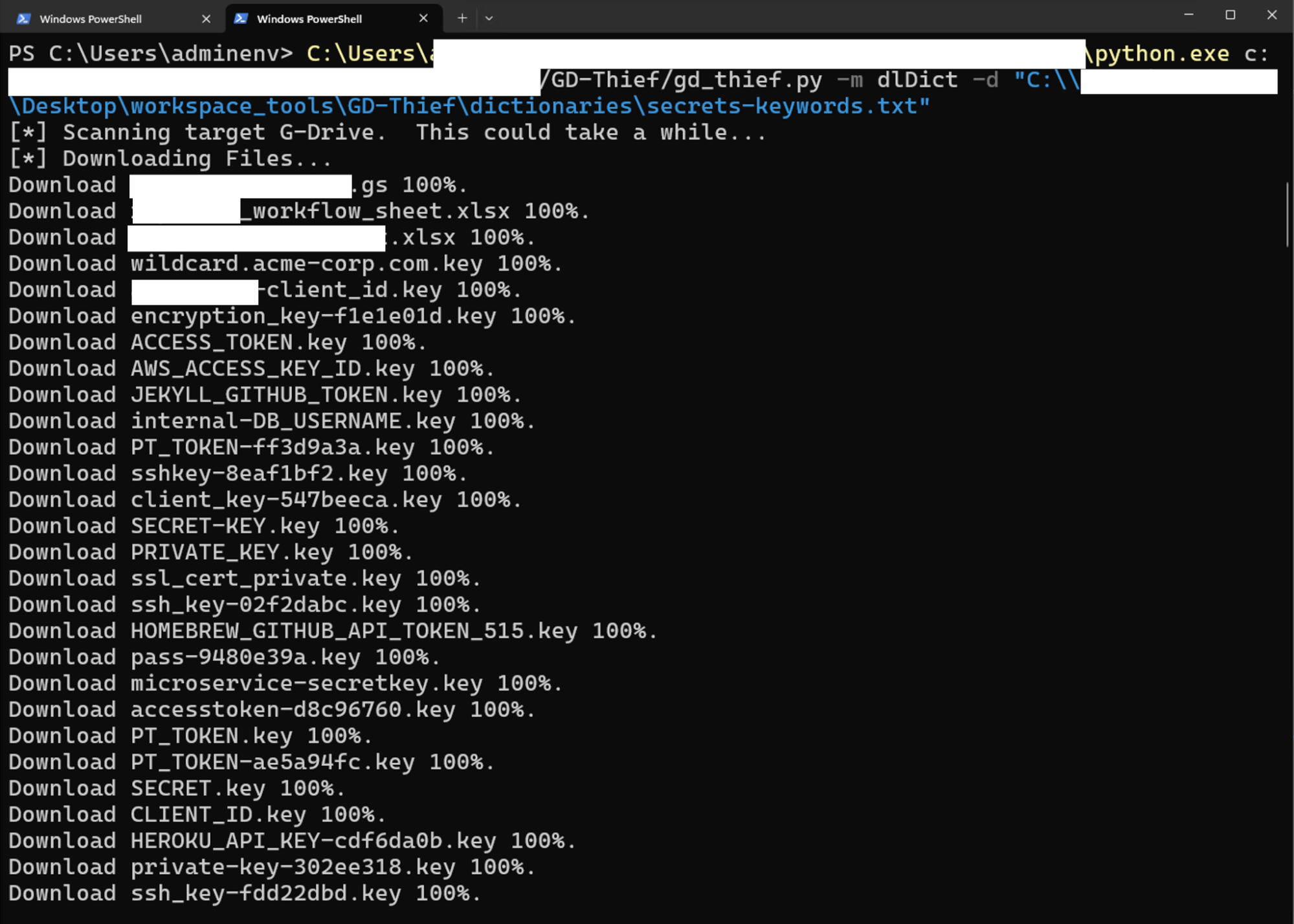
Figure 2. Showing the output of using GDThief with the application consent given before.
Credential Modification and Admin Abuse
When an adversary encounters an MFA challenge on a highly privileged service account during a password spray, they don't simply give up; they pivot to administrative abuse. If the attacker has already compromised a lower-tier administrative account or a help desk user's credentials, they can weaponize these privileges to manipulate the target's security settings directly.
By navigating the Google Workspace Admin Console, the attacker can generate backup verification codes (scratch codes) or entirely disable the login challenge for the targeted service account. This not only facilitates lateral movement into the high-value account but also establishes a persistent backdoor. This administrative abuse leaves a distinct audit trail-such as generate_scratch_codes or disable_mfa events allowing defenders to spot the exact moment a technical control was bypassed.
Data Gathering and Exfiltration
Gmail Forwarding Rules
One of the most effective persistence techniques involves creating Gmail forwarding rules. After compromising an account, the adversary configures a rule to forward all incoming email, or emails matching specific criteria such as "invoice," "payment," or "confidential", to an external email address under their control. This rule persists even after the compromised account's password is changed. The adversary receives a continuous stream of the victim's email without needing to maintain active access to the account, effectively creating a silent wiretap on the organization's communications.
Alternatively, the adversary may modify Gmail routing settings at the organizational level if they have admin access, redirecting email flows in ways that are difficult to detect without careful monitoring of admin audit logs.
Bulk Data Download and External Sharing
Adversaries may also exfiltrate data by changing file sharing settings to make documents accessible via anonymous links, sharing files or entire folders with external accounts they control, or performing bulk downloads that transfer large volumes of data outside the organization. Each of these actions uses legitimate Google Drive features, the same features that employees use every day for collaboration, making them extremely difficult to detect without behavioral baselines that can identify when the volume, timing, or pattern of activity deviates from what is normal for a specific user.
How Can Security Teams Detect and Stop Google Workspace Attacks Using Cortex XSIAM?
The attack kill chain described above presents a fundamental detection challenge: every individual action the adversary takes uses legitimate Google Workspace features and APIs. There are no malware signatures to match, no suspicious executables to flag, and no anomalous network connections to block. The adversary's activity is, at the API level, indistinguishable from normal business operations.
This is precisely where Cortex XSIAM's behavioral analytics and Identity Threat Detection and Response (ITDR) capabilities provide the critical detection layer.
Behavioral Baselines and Anomaly Detection
By ingesting and analyzing the rich data stream from Google Workspace audit logs, including login events, OAuth authorizations, Admin Console changes, and Drive activity, the platform establishes behavioral baselines for each user and entity in the organization. These baselines capture what is normal: which applications a user typically authorizes, how many files they access per hour, what times they are active, which IP addresses and locations they connect from, and what administrative actions they perform.
When an adversary deviates from these baselines, authorizing a new OAuth application with unusually broad scopes, accessing hundreds of files in rapid succession, creating forwarding rules to never-before-seen external domains, or performing admin actions from an account that has never touched the Admin Console, Cortex XSIAM identifies these deviations and generates alerts.
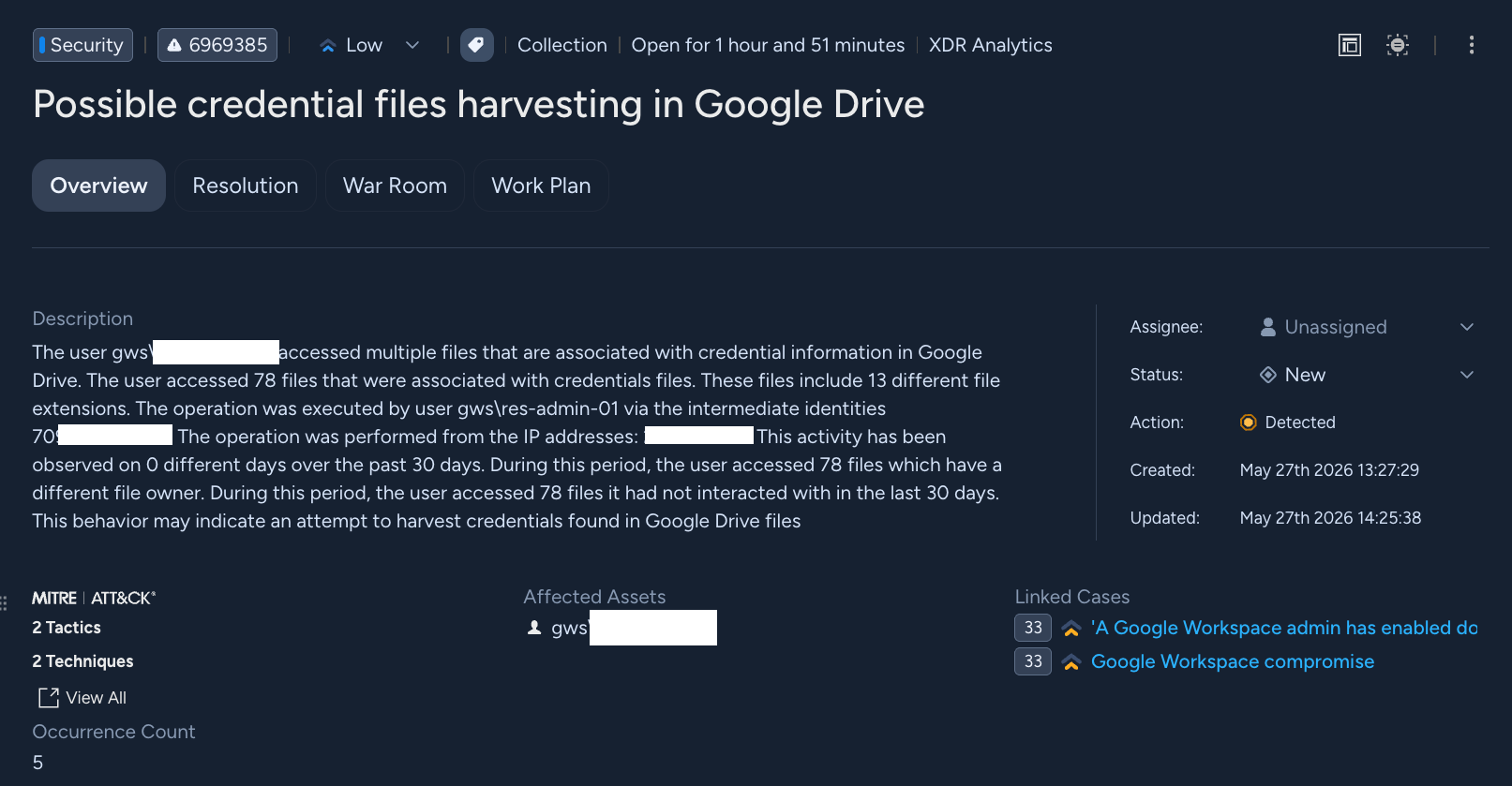
Figure 3. A Google Workspace “Possible credential files harvesting in Google Drive” example from Cortex XSIAM.
Multi-Signal Incident Correlation
The true power of the platform lies not in detecting individual anomalies, but in correlating multiple signals across the attack kill chain into a single, coherent incident. Consider the attack we deconstructed in this blog: a credential stuffing attempt against a legacy account, followed by an OAuth application authorization with sensitive scopes, a burst of Drive file access targeting credential-containing files, a Gmail forwarding rule creation to an external domain, and Admin Console changes weakening security policies.
Each of these events individually might generate a low- or medium-severity alert. An OAuth authorization alone is not necessarily malicious. A forwarding rule creation might be legitimate. But when Cortex XSIAM correlates these events, recognizing that they involve the same identity, occur within a compressed timeframe, and follow the pattern of a known attack kill chain, the platform connects them into a single high-severity incident that tells the complete story of the compromise.
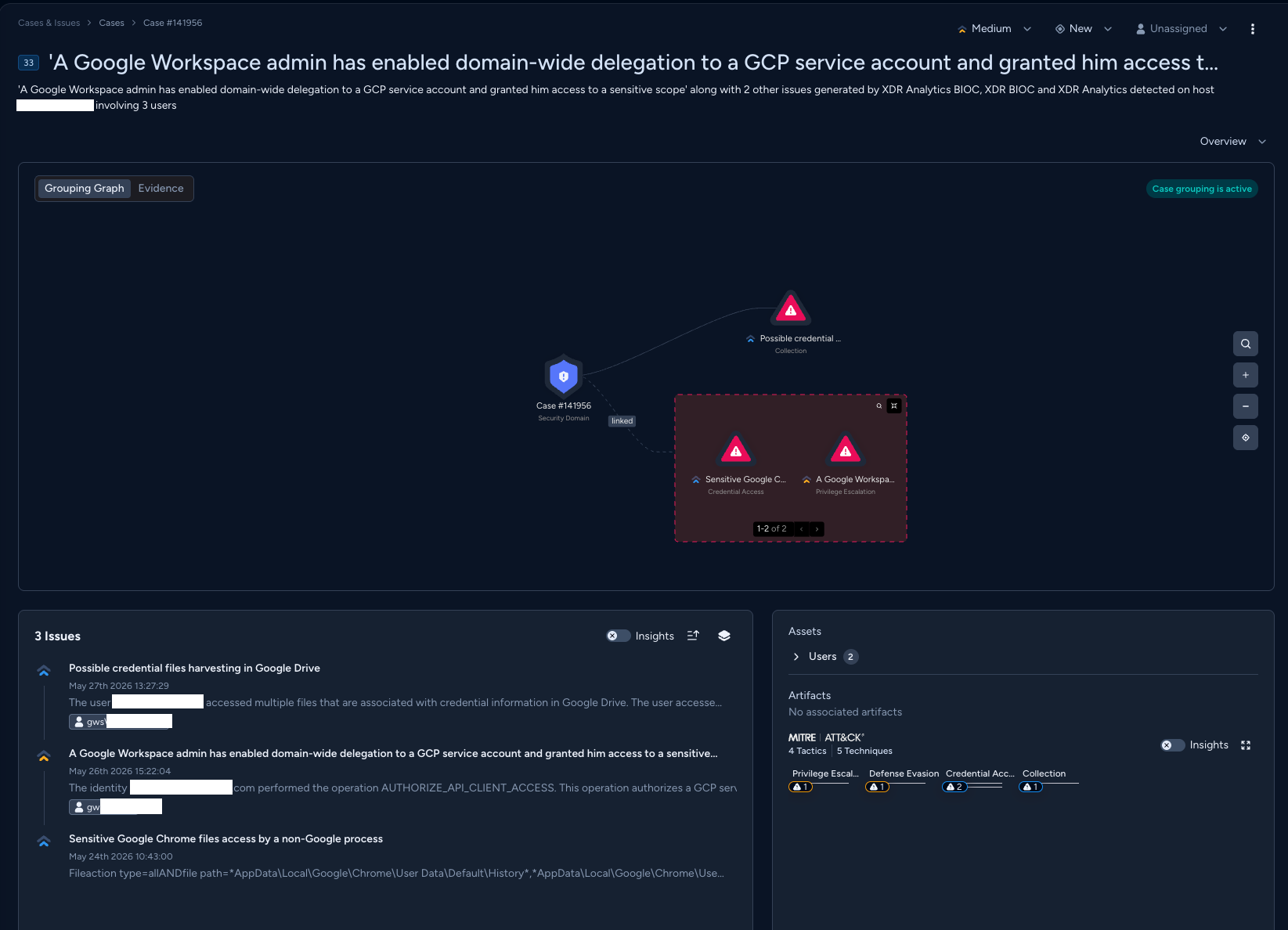
Figure 4. A Google Workspace case investigation example from Cortex XSIAM.
Conclusion
Throughout this blog, we deconstructed a realistic attack kill chain targeting Google Workspace, from initial OAuth consent phishing and credential stuffing against legacy accounts, through internal discovery and reconnaissance using the platform's own APIs, to persistence via Gmail forwarding rules and Admin Console manipulation, and ultimately automated credential harvesting and data exfiltration using tools like GD-Thief. This highlights a critical shift in the threat landscape: Google Workspace is no longer just an email and productivity platform, it is the identity backbone of the organization, and its compromise can cascade across every service and dataset that trusts it as the identity authority.
Detecting these threats requires moving beyond perimeter controls and endpoint-focused security tools. The attacks we examined involve no malware, no suspicious executables, and no anomalous network traffic, every action the adversary takes uses legitimate Google Workspace features and APIs. The subtle operational footprints left behind, an unusual OAuth authorization, an anomalous spike in file access, a forwarding rule to a never-before-seen domain, can only be identified through deep behavioral analytics applied to the platform's audit data. By correlating these signals into a clear, coherent story, a platform like Cortex XSIAM can expose an attack that would otherwise remain hidden within the noise of normal business operations.
XSIAM Alerts and MITRE Techniques
Table 1 lists the Cortex XSIAM alerts available for Google Workspace in ITDR and their associated MITRE ATT&CK technique.
| Alert Name | ATT&CK Technique |
| A GCP service account was delegated domain-wide authority in Google Workspace | Domain or Tenant Policy Modification |
| A Google Workspace identity created, assigned or modified a role | Valid Accounts |
| A Google Workspace identity used the security investigation tool | Data from Information Repositories |
| A Google Workspace service was configured as unrestricted | Domain or Tenant Policy Modification |
| A domain was added to the trusted domains list | Impair Defenses |
| A mail forwarding rule was configured in Google Workspace | Email Collection: Email Forwarding Rule |
| An app was added to Google Marketplace | Remote Access Tools |
| An app was added to the Google Workspace trusted OAuth apps list | Modify Authentication Process |
| An app was removed from a blocked list in Google Workspace | Modify Authentication Process |
| Chrome OS Remote Access policy was modified in Google Workspace | Impair Defenses |
| Data Sharing between GCP and Google Workspace was disabled | Indicator Removal |
| External Sharing was turned on for Google Drive | Transfer Data to Cloud Account |
| Gmail routing settings changed | Data Staged |
| Google Marketplace restrictions were modified | Domain or Tenant Policy Modification |
| Google Workspace automation was created | Command and Scripting Interpreter |
| Google Workspace third-party application's security settings were changed | Domain or Tenant Policy Modification |
| Google Workspace user authentication information changed | Modify Authentication Process: Multi-Factor Authentication |
| Large volume of files potentially containing credentials accessed in Google Drive | Data from Cloud Storage |
| MFA Disabled for Google Workspace | Modify Authentication Process |
| MFA was disabled for a Google Workspace user | Modify Authentication Process: Multi-Factor Authentication |
| Massive files deletion in Google Drive | Data Destruction |
| Security object deletion in Google Workspace Admin Console | Impair Defenses: Disable or Modify Tools |
| Suspicious OAuth application was authorized in Google Workspace | Phishing |
Table 1. Relevant alerts and MITRE techniques.
Take Control of Your Security with Cortex XSIAM
Ready to secure your SaaS environment? Cortex XSIAM provides the behavioral analytics and ITDR capabilities needed to detect sophisticated attacks within Google Workspace and many others.