Who This Is For
This guide is for security architects, IT leaders, and compliance teams evaluating endpoint data loss prevention (DLP) solutions for organizations where employees routinely use AI tools, cloud storage, and desktop communication apps. If you're responsible for enforcing data security policies across a hybrid or remote workforce - and you're finding that traditional DLP leaves critical blind spots - this is for you.
Why Traditional DLP Is No Longer Enough
Endpoint DLP, software that monitors and blocks sensitive data transfers directly at the device level, has become the critical line of defense for modern organizations. Unlike traditional DLP, which inspects traffic as it passes through a perimeter, endpoint DLP operates where data is actually created and shared: on the employee's machine, regardless of whether they're on the corporate network.
Employees are uploading code files or other work documents into ChatGPT for review and refinements, summarizing financial PDFs with GenAI tools, and sharing documents via instant messaging tools like WhatsApp Desktop and Telegram or uploading files for backup or collaboration purposes to cloud drives.
This post covers three critical endpoint vectors where data is most at risk, what effective DLP controls look like for each, and a practical breakdown of five common scenarios where employees inadvertently create exposure.
How Does Endpoint DLP Block Sensitive Data Uploads to AI Tools?
Users are adopting new AI tools faster than IT can categorize them, and relying solely on URL filtering to keep up is a losing battle. New AI models launch constantly, blocking them one by one is reactive, resource-intensive, and always a step behind.
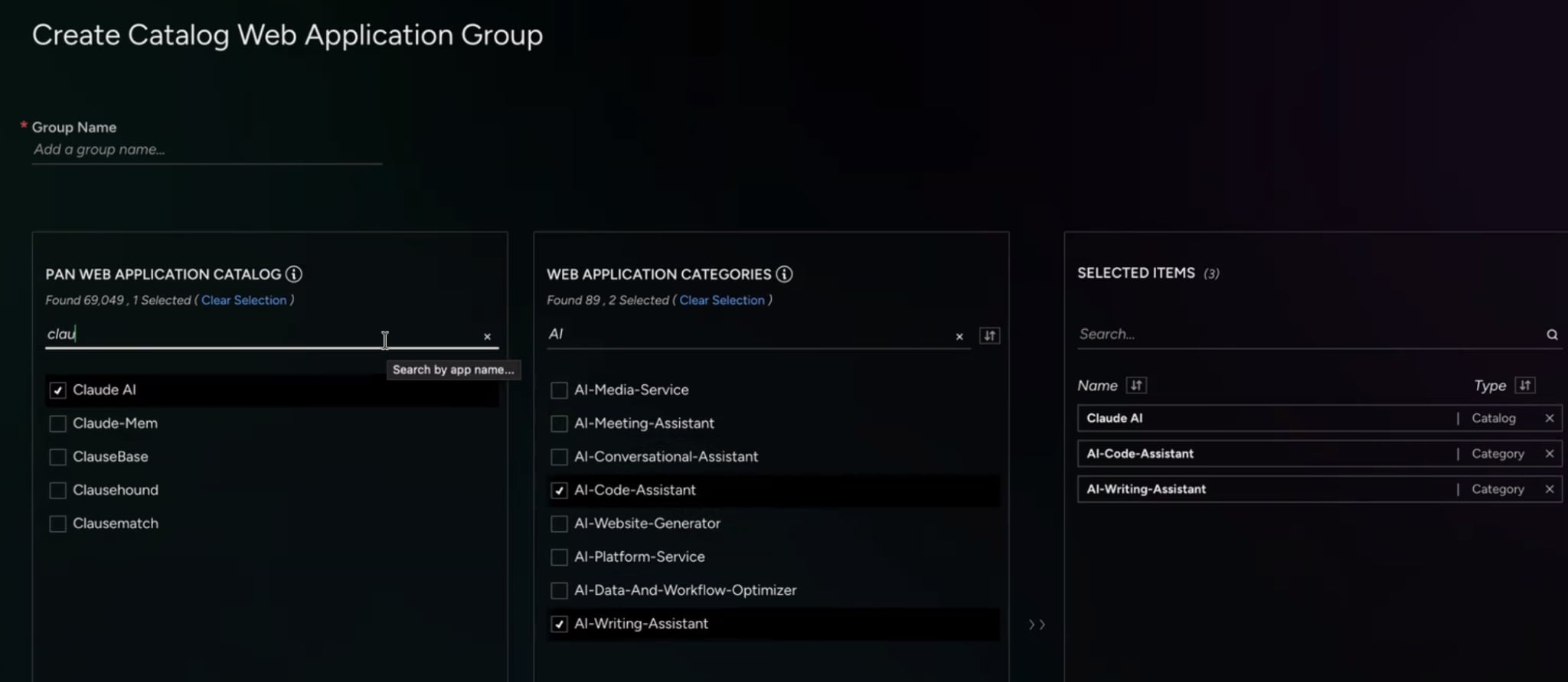
The more effective approach is category-based blocking at the endpoint. Instead of maintaining an ever-growing list of individual AI domains, security teams can enforce policies based on application type — for example, "AI Code Generation" or "AI Conversational Assistant" — and automatically block sensitive data uploads to any tool that falls into that category, including tools that didn't exist until recently.
This is how Cortex Endpoint DLP addresses the GenAI explosion: by classifying AI tools by function rather than by name, policies remain effective against unknown and emerging tools without requiring constant manual updates from the security team.
Does Endpoint DLP Inspect Data Egress to Desktop Applications?
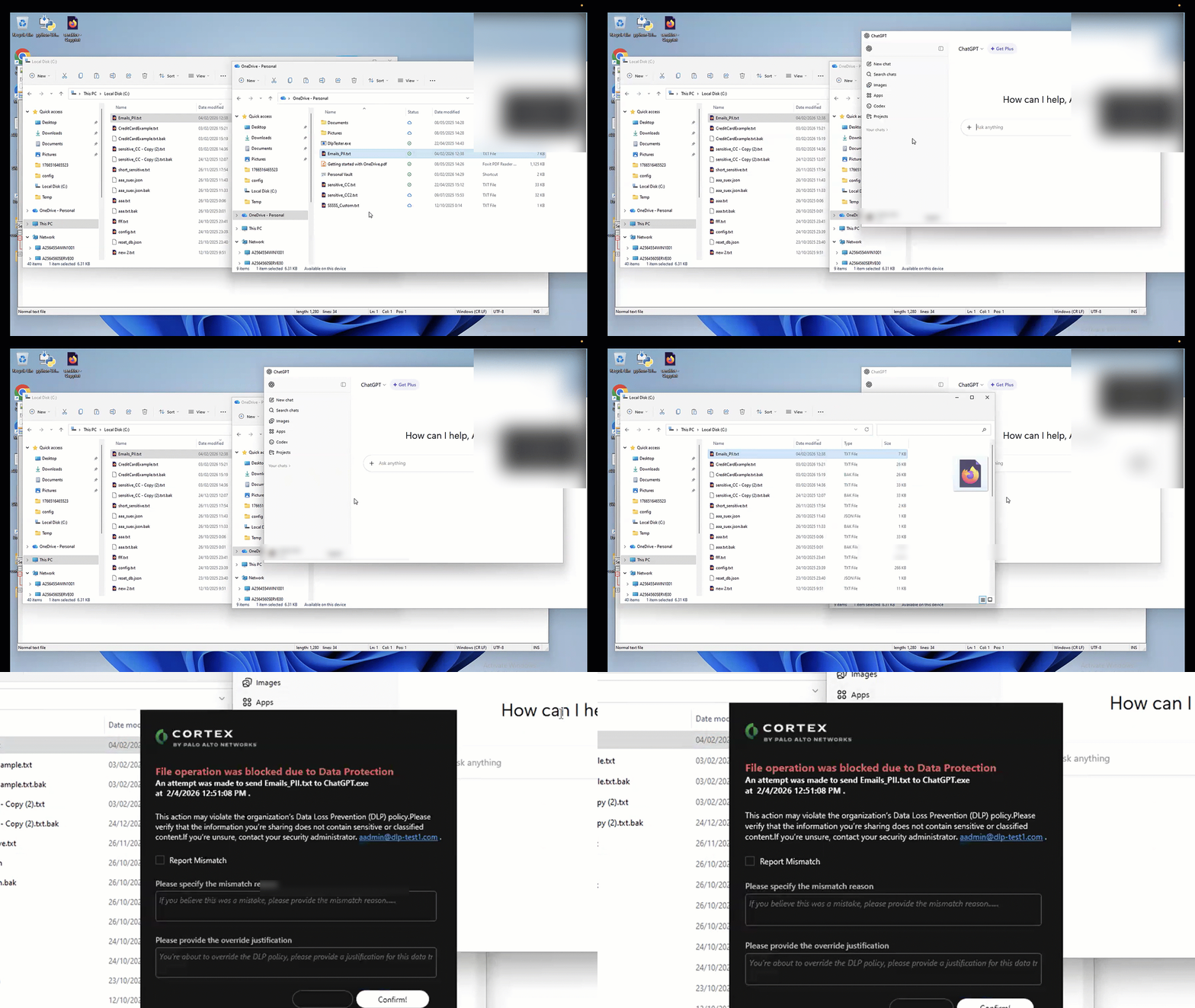
Employees frequently use dedicated desktop applications for tools like ChatGPT, Slack, and WhatsApp, as well as cloud drives synchronized with their endpoints.
Our endpoint agent monitors data uploaded to installed applications. This ensures that the robust data loss prevention you apply to web traffic is extended with the exact same rigor to desktop applications, stopping exfiltration right at the source before the information leaves the endpoint, regardless of how the user accesses the service and even if the application uses encrypted P2P connections.
How Can Endpoint DLP Tell the Difference Between a Corporate and Personal Cloud Account?
Employees frequently mix personal and corporate accounts on a single device. A blanket block on Google Drive or Dropbox would prevent legitimate work. But allowing unrestricted access lets sensitive files flow to personal backup folders with no audit trail.
Context-aware Endpoint DLP solves this by understanding identity directly on the browser, identifying non-corporate accounts. Rather than making a binary allow/block decision based on the application, it evaluates which account is in use. A file can be seamlessly allowed to sync to a Corporate Google Drive while being instantly blocked from copying to the same user's personal Google Drive — in real time, without interrupting the user's workflow for legitimate activity.
This level of context-awareness is what separates a productive DLP deployment from one that generates constant friction and workaround behavior.

Does Endpoint DLP Require Sending Data to the Cloud for Scanning?
A common concern with DLP deployments is latency and privacy: if every file must be sent to a cloud scanning service before a transfer is permitted, the performance impact can be significant, and the act of sending data off-device for inspection can itself create exposure.
Modern endpoint DLP avoids this entirely through on-device classification. Data is analyzed locally in a secure sandbox on the endpoint and never leaves the device for scanning. This approach delivers three concrete benefits:
• Absolute privacy — no file content is transmitted to an external scanning service
• Zero latency from cloud inspection — blocking decisions happen in milliseconds
• Offline enforcement — policies remain active even when the device is not connected to the corporate network or VPN
On-device classification also enables a more user-centered enforcement model. Rather than silently blocking an action (which kills productivity and generates help desk tickets), effective Endpoint DLP can deliver an interactive, real-time prompt that explains why the action was blocked and guides the employee to a sanctioned alternative. This turns a potential security incident into a micro-training moment.
How Does Endpoint DLP Support Compliance with GDPR, HIPAA, and CCPA?
Data protection regulations share a common requirement: organizations must demonstrate that they know where sensitive data lives, who is accessing it, and what controls are in place to prevent unauthorized disclosure. Endpoint DLP directly supports each of these obligations.
• GDPR (Article 32) requires technical measures to ensure appropriate security of personal data, including protection against unauthorized disclosure. Endpoint DLP enforces these controls at the point of transfer.
• HIPAA's Security Rule mandates safeguards against unauthorized access to ePHI. On-device DLP classification can identify health information in files before it reaches an unsanctioned destination.
• CCPA requires organizations to implement reasonable security procedures. Documented DLP policies with enforcement logs provide evidence of those procedures.
Beyond regulatory checkboxes, endpoint DLP also provides the audit trail that compliance teams need: a timestamped record of what data was accessed, what transfer was attempted, and what action was taken, correlated with user identity and device health.
Ways Employees Accidentally Leak Data Through AI Tools (And What DLP Should Do About Each)
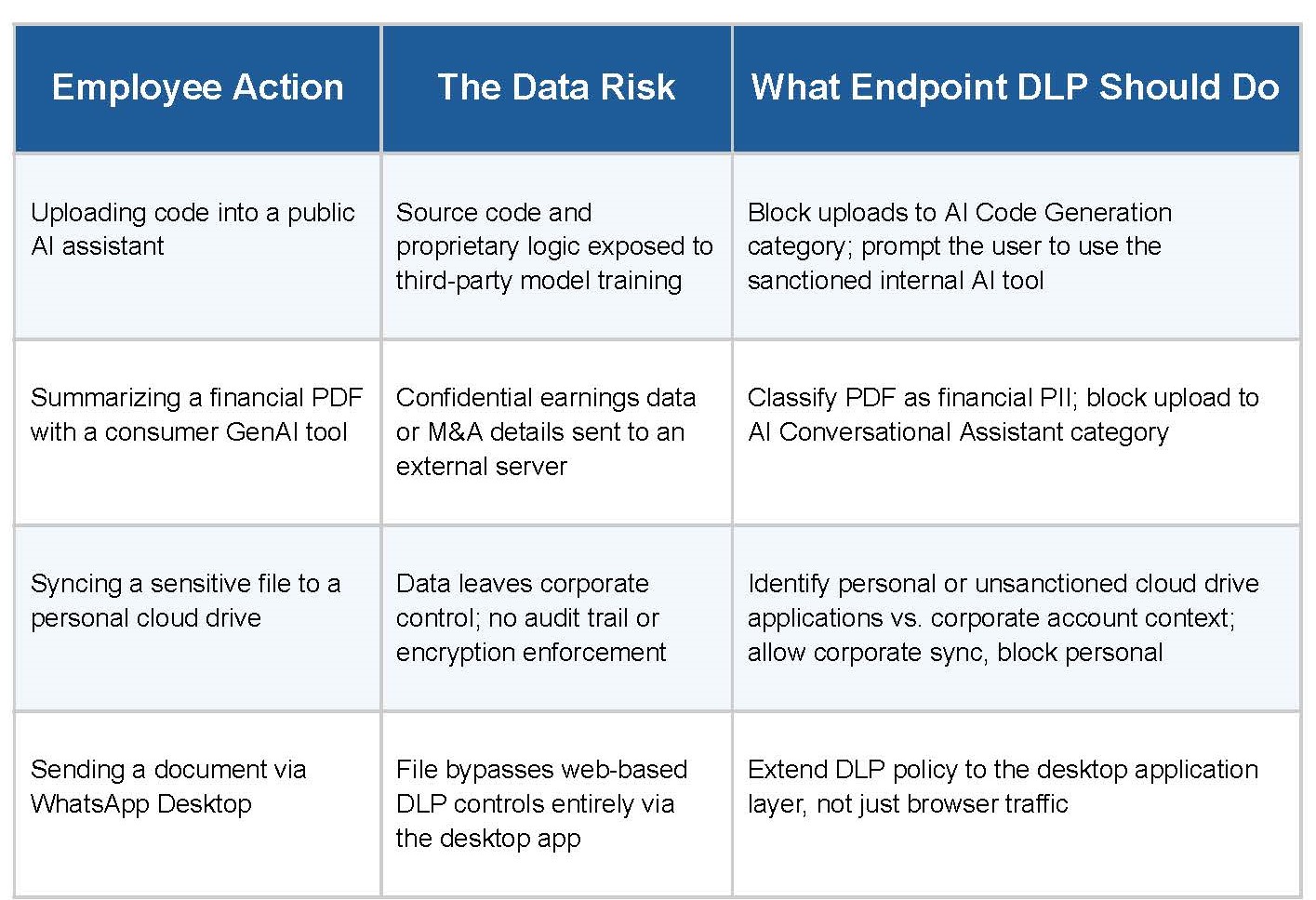
The following scenarios represent the most common inadvertent data exfiltration patterns in organizations that have deployed AI and collaboration tools without endpoint-level DLP controls. Each represents a real policy gap, and a specific enforcement response.
Each of these scenarios has one thing in common: the employee wasn't trying to cause a breach. Effective endpoint DLP accounts for this by enforcing controls at the point of action while educating employees in real time, reducing both risk and friction simultaneously.
How Endpoint DLP Fits Into a Broader Security Platform
When DLP operates as a standalone tool, security analysts face a fragmentation problem: a blocked data event exists in one console, endpoint health lives in another, and user behavior analytics lives in a third. Correlating a potential insider threat or malware-assisted exfiltration requires manual pivoting across systems.
Integrating DLP directly into the endpoint detection and response (EDR) layer solves this by providing unified context in a single console. A security analyst can pivot from a blocked data transfer event to see the user's recent process activity, network connections, and lateral movement indicators, all without switching consoles. This correlation is what separates an isolated DLP alert from actionable threat intelligence.
Cortex Endpoint DLP is built into the Cortex XDR agent for exactly this reason: data security decisions are enriched with full endpoint context, enabling faster triage and more accurate risk prioritization.
The Bottom Line
Endpoint DLP for AI tools is no longer optional for organizations where employees work with sensitive data on managed devices. The combination of AI tool proliferation, desktop application blind spots, and mixed personal/corporate account usage has created data security gaps that traditional DLP controls cannot close.
The organizations closing those gaps are doing it with endpoint-native DLP that understands context, enforces policy offline, and integrates with the broader security stack.
Ready to See For Yourself?
Schedule your personalized demo of Endpoint DLP today