Search
How to Set Up a Proxy Server | Guide to Using a Proxy Server
The proxy server setup process typically involves adjusting network settings, specifying proxy details, and applying authentication or security policies, depending on the use case.
For consumer-grade proxies, setup is usually straightforward—focused on configuring a browser or device. Enterprise proxies, by contrast, require more detailed planning and integration within broader security infrastructure.
5 min. read
What is a proxy server?
A proxy server is a network-layer function that handles traffic between a client and its destination by inspecting, forwarding, or rewriting requests based on predefined settings.
On personal devices, proxies are often used for privacy, content access, or simple filtering.
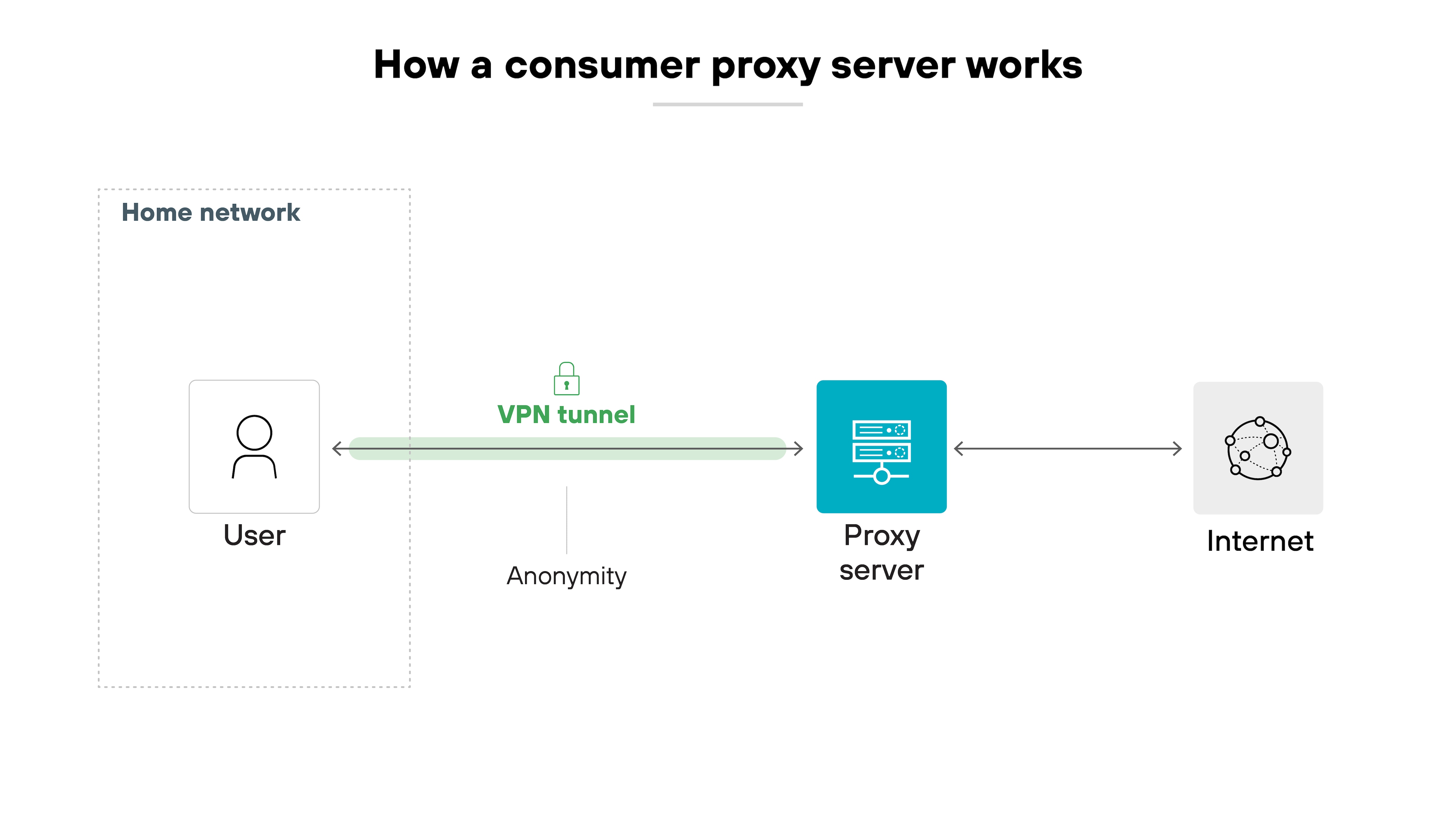
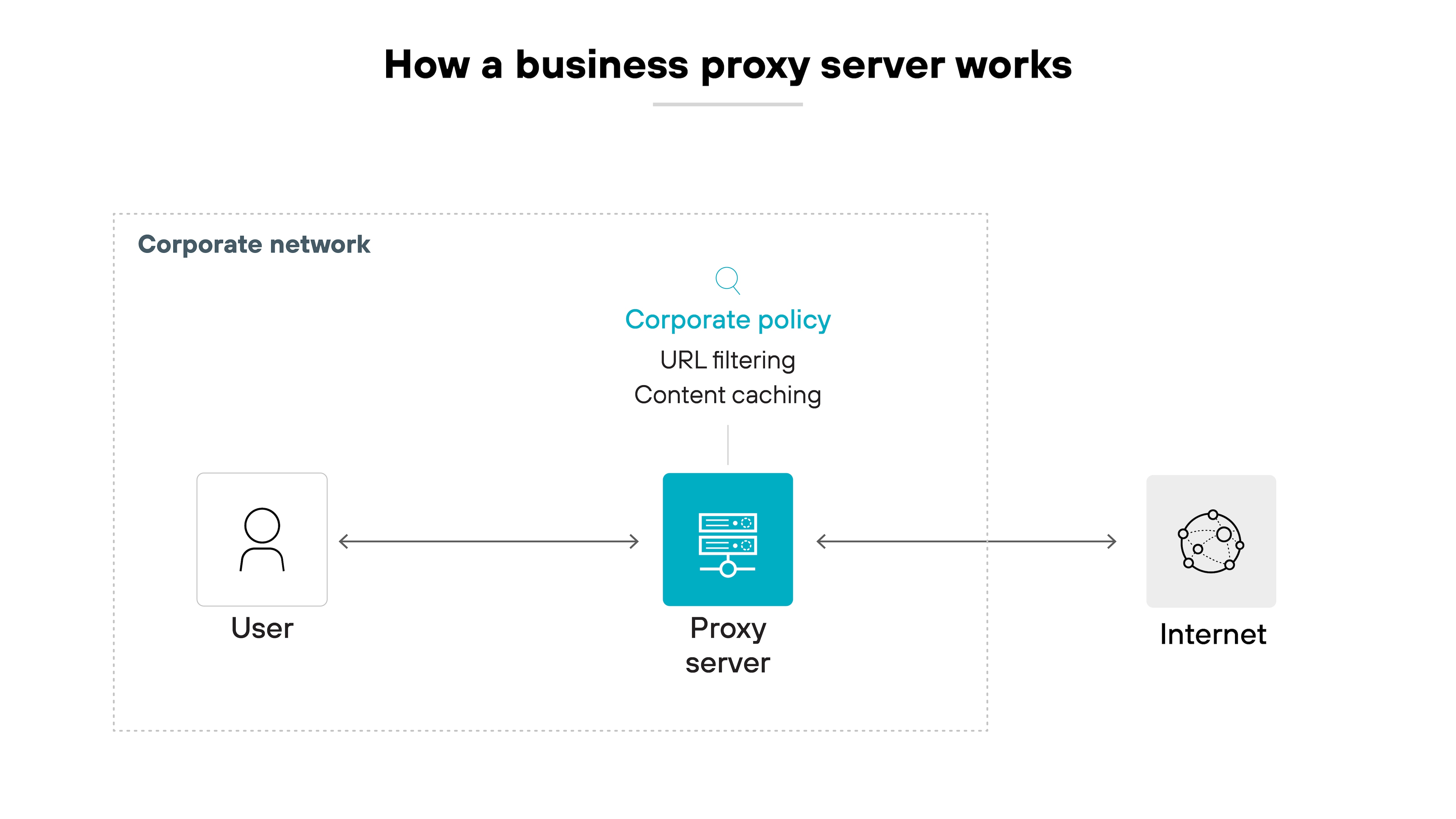
In enterprise environments, proxy capabilities are typically built into broader security infrastructure such as next-generation firewalls, load balancers, and web application firewalls.
How to set up a proxy server (consumer)
Setting up consumer-grade proxy servers across different platforms is usually a quick process, but the exact steps vary.
For the purposes of this article, we'll focus on the most common operating systems and browsers: Windows, macOS, Google Chrome, Android, iOS, macOS, Microsoft Edge, and Firefox.
To set up a proxy server manually on Windows, follow these steps:
- Press the Windows + I keys together to open Windows Settings.
- Navigate to Network & Internet and select Proxy.
- In the Manual proxy setup section, switch Use a proxy server to On. Make sure the “Automatically detect settings” toggle is also on.Note:By default, Windows automatically searches to see if your organization, school, or network has an automatic proxy server setup. If it detects one, Windows will display its details and guide you through the setup process. If a PAC file is found, go to the Automatic Proxy Setup and enable the "Use Setup Script" option. PAC files provide proxy configuration instructions without the need of user input.
- Enter the proxy IP address and port provided by your service.
- If there are websites you want to bypass the proxy, you can add them to the exception list using a semicolon-separated format.
- Click Save to apply the changes.
Your Windows PC is now set to route traffic through the proxy server you configured.
- Open System Settings from the Apple menu.
- Select Network and choose the network you want to configure (either Wi-Fi or Ethernet).
- Click Advanced, then go to the Proxies tab.
- You can either enable Auto Proxy Discovery or configure the proxy manually by entering the server address and port.
- If your proxy server requires authentication, check Proxy server requires password and enter your username and password.
- Click OK to save your proxy server settings.
Your macOS system will now use the proxy server you configured.
Google Chrome uses your system's proxy server settings by default. Here's how you can change them:
- Open Chrome and click the three-dot menu in the top-right corner.
- Select Settings and scroll to the bottom to find System.
- Under the System section, click Open your computer's proxy settings.
- Follow the instructions for either Windows or macOS to configure the proxy settings.
Note:Since Chrome doesn't manage proxies internally, you need to adjust the settings within your operating system.
To set up a proxy server on your Android device:
- Open Settings and go to Wi-Fi.
- Long-press the network you are connected to and select Modify Network.
- Tap Advanced options, then select Manual under the Proxy section.
- Enter the proxy hostname and port number.
- Tap Save to apply the proxy server settings.
Note:This proxy setup applies only to the current Wi-Fi network. You'll need to configure proxies separately for other networks.
To set up a proxy server on an iPhone or iPad:
- Open Settings and tap Wi-Fi.
- Select the Wi-Fi network you're connected to and scroll down to the HTTP Proxy section.
- Tap Configure Proxy, then select either Manual or Automatic if you prefer to automatically configure the proxy.
- For manual setup, enter the server address, port, and (if required) your authentication credentials.
- Tap Save to confirm.
The proxy settings will now be applied to your iOS device when connected to this Wi-Fi network.
To configure a proxy in Safari:
- Open Safari and click Safari > Preferences in the toolbar.
- Go to the Advanced tab and click Change settings next to Proxies.
- You will be redirected to the system's Network settings where you can enter the proxy details as outlined earlier for macOS.
- Click OK to apply the changes.
Safari now uses the system-wide proxy settings for browsing.
For Edge, the proxy setup is tied to the system settings:
- Open Edge and click the three dots in the top-right corner.
- Select Settings, then go to System and performance.
- Click Open your computer's proxy settings.
- Follow the instructions for Windows to configure the proxy.
Edge will use the proxy settings that you define within Windows.
Unlike other browsers, Firefox has its own proxy settings:
- Open Firefox and click the menu button (three horizontal lines) in the top-right corner.
- Select Settings and scroll down to the Network Settings section.
- Click Settings… next to Configure how Firefox connects to the internet.
- Choose Manual proxy configuration and enter the proxy IP and port number.
- Click OK to save the settings.
Firefox will now route all web traffic through the configured proxy server.
How to set up a proxy server (enterprise)
In enterprise environments, proxy servers aren't usually standalone appliances or services. They're a built-in function—again, often part of an NGFW, WAF, or similar security infrastructure.
Which means: there's no universal setup process. You're not just buying a proxy server, turning it on, and calling it a day.
Instead, setting up proxy functionality at the enterprise level depends entirely on what you're trying to do with it. The proxy isn't the product. It's one capability among many, deployed in different ways based on the organization's architecture and goals.
Here's how to approach the setup process:
Start by defining what you need the proxy to do. Enterprise proxy configurations vary depending on the outcome you're targeting.
Some examples:
- Caching content at a branch site with limited bandwidth
- Filtering web traffic to enforce acceptable use policies
- Decrypting and inspecting TLS traffic for security purposes
There's no one-size-fits-all answer. The proxy's behavior and deployment method change based on these needs.
Once you've defined the use case, choose the right product that supports it.
That might be:
- An NGFW with web proxy capabilities
- A cloud-delivered secure web gateway
- A WAF with traffic inspection and filtering features
Some legacy vendors used to offer standalone proxy appliances, but most of that functionality has since been folded into more comprehensive platforms.
Next, figure out where the proxy needs to live in the network.
For example(s):
- A branch office may need a local device to cache content and reduce backhaul
- A headquarters location may route user traffic through a central proxy for inspection
- A hybrid setup may offload certain functions to a cloud security service
Note:
Where it sits affects performance, visibility, and policy enforcement. This decision usually involves coordination with the network and security teams.
Once the deployment point is selected, set up routing or NAT rules to steer traffic through the proxy.
This may involve:
- Explicit proxy settings on managed endpoints
- Transparent proxying using destination NAT
- Tunneling user traffic to a cloud proxy via GRE, IPsec, or other mechanisms
Note:
The method depends on what the tool supports—and how much control you have over the clients and the network.
Finally, configure policies for how the proxy should handle traffic.
This includes:
- URL filtering
- Application control
- User access policies
- Decryption and inspection settings
- Caching behavior (if applicable)
At this stage, you're no longer “setting up the proxy” as a device. You're configuring its behavior as part of a broader policy framework.
| Further reading: Secure Web Gateway vs. Proxy Server: What Is the Difference?
What is the role of a proxy server in business environments?
As discussed, in enterprise settings, proxy functionality is applied to meet specific operational goals. Typically as part of a broader platform rather than a standalone solution.
Common use cases include:
TLS inspection: Decrypting encrypted traffic so it can be scanned for threats.
Policy enforcement: Controlling access to web content and applications based on user, group, or location.
Traffic steering: Routing traffic through designated inspection or filtering paths.
Content caching: Improving performance and reducing bandwidth use by locally storing frequently accessed resources.
The exact role a proxy plays really depends on the organization’s architecture and objectives. There’s no universal template. Just targeted use.

Find out how to modernize your proxy architecture for scalable, cloud-ready security, featuring Future-proofing Your Proxy Architecture.
Download white paperProxy server setup FAQs
Yes, you can create a proxy server using various tools, such as software like Squid, or by configuring a server to route traffic through your designated IP.
Building a proxy server involves writing custom software that acts as an intermediary between clients and servers, handling traffic routing, filtering, and possibly caching. This requires knowledge of network protocols, programming languages like Python or Go, and implementation of security, traffic forwarding, and optional features like logging or caching.
To create a proxy for your network, configure a server with proxy software (e.g., Squid) or use network security appliances that integrate proxy functionalities.
You can set up a proxy for WiFi by configuring your device’s network settings to use a proxy server. This process is done through system preferences or browser settings.
To create a local proxy server, you need to install proxy server software on a machine that will act as the intermediary. Popular software options include Squid, Privoxy, or Nginx. Once installed, configure the server to route and filter traffic as needed, then point local devices to the proxy's IP address and port.
To manually set up a proxy, access your device’s network settings, enable manual proxy setup, and input the proxy’s IP address and port.
Connecting to a proxy server typically involves ensuring the proxy is already set up on your system and configured correctly in your network settings. Once configured, the connection happens automatically when you access the internet.
You can obtain a proxy server address from your network administrator, internet service provider (ISP), or a proxy service provider.
The cost varies. Consumer proxy setup can be free if using existing device settings, while enterprise proxies require investment in infrastructure, licensing, or security solutions, often included in larger network products.
Free proxies can be set up by configuring your device’s network or browser settings, using publicly available proxy servers. However, free services may be less reliable or secure.


