Search
Table of Contents
- Machine Identity Security: The Definitive Guide
- What Is an SSL Stripping Attack?
-
What Is the TLS Handshake? Process, Steps, and Best Practices
- The Strategic Importance of the TLS Handshake
- How the TLS Handshake Works: Step-by-Step
- TLS 1.2 vs. TLS 1.3: Evolution of Speed and Security
- The Role of Cipher Suites and Digital Certificates
- Identifying and Resolving TLS Handshake Failures
- Advanced Security: TLS Fingerprinting and Threat Detection
- TLS Handshake Best Practices
- TLS Handshake FAQs
- Security Standards and Compliance: SSL/TLS Best Practices
-
What Is the TLS Certificate Lifecycle? Implementation Guide
- TLS Certificate Lifecycle Explained
- The 6 Core Stages of the TLS Certificate Lifecycle
- Why TLS Certificate Lifecycle Matters
- Key Causes of Certificate Failure
- Validation Checks: CRL and OCSP
- How Automation Improves TLS Certificate Lifecycle
- TLS Certificate Lifecycle and Zero Trust
- TLS Certificate Lifecycle FAQs
- What Is PKI? Public Key Infrastructure & Authentication Guide
- What Is a Self-Signed Certificate? Risks, Uses & Best Practices
- What Is Certificate Management?
-
What Is Certificate Validation? Guide to Best Practices
- Certificate Validation Explained
- The Role of Certificate Authorities and the Chain of Trust
- The Hierarchy of Trust
- The Sequence of the Validation Process
- Types of Certificate Validation Levels
- Unit 42 Insights: The Risk of Identity Exposure
- Threat Behavior Observations
- Troubleshooting Common Validation Failures
- Certificate Validation FAQs
-
What Is TLS Certificate Renewal? Process, Risks & Automation
- TLS Certificate Renewal: The Shift from Maintenance to Mission-Critical
- Why the 47-Day Mandate Redefines Renewal Strategy
- The Technical Lifecycle of a TLS Renewal
- Critical Risks: The High Cost of Renewal Failure
- Best Practices for Enterprise-Scale Renewal
- Overcoming Common Renewal Challenges
- TLS Certificate Renewal FAQs
- What Is an X.509 Certificate? Definition, Standards, and Role
-
What Is Cert-Manager? Kubernetes Certificate Management Explained
- cert-manager Explained
- Core Components: Issuers and Certificates
- 1. Issuers and ClusterIssuers
- 2. Certificates
- How cert-manager Automates Machine Identity
- Common Compatible Cloud Platforms
- Zero Trust and Kubernetes Security Alignment
- Integrating cert-manager into DevSecOps Workflows
- Benefits for DevSecOps Teams
- cert-manager FAQs
- What Is a TLS Decryption? Methods, Risks & Best Practices
- What Is a Multi-Domain SSL Certificate? SAN & UC Explained
-
TLS/SSL Offloading: Definition & Decision Checklist
- TLS/SSL Offloading Explained
- SSL Termination vs. SSL Bridging
- Key Differences in Workflow
- Unit 42 Perspective: Risks of Uninspected Traffic
- Benefits for Security and Infrastructure Teams
- CISO Decision Checklist: SSL Termination vs. SSL Bridging for Compliance
- Detailed CISO Decision Checklist
- Summary Recommendation for CISOs
- TLS/SSL Offloading FAQs
- What is Code Signing? Benefits, Risks & Implementation
- What Is ACME Protocol?
-
What Is Certificate Pinning? Benefits, Risks & Best Practices
- Certificate Pinning Explained
- How Certificate Pinning Works
- Listiche: Key Stages of a Pinning Failure
- Types of Certificate Pinning
- Listiche: Static vs. Dynamic Pinning
- Why Pinning Is Essential for Zero Trust
- Certificate Pinning vs. Standard SSL/TLS
- Benefits of Certificate Pinning
- Risks and Limitations of Certificate Pinning
- When to Use Certificate Pinning
- When to Avoid Certificate Pinning
- Certificate Pinning Best Practices
- Certificate Pinning and Machine Identity Security
- FAQs
- What Is a TLS/SSL Port? Port 443 and HTTPS Explained
- TLS Certificate Risks: Vulnerabilities and Mitigation Strategies
- What Is a Certificate Authority?
- What Is a Certificate Chain of Trust?
- What Is Workload Identity? Securing Non-Human Identities
- What Is a Non-Human Identity (NHI)? Machine Identity Security Explained
-
What Is a Machine Identity?
- How Do Machine Identities Work?
- Machine Identity Management (MIM) vs. Human IAM
- Architecture Components and Identity Types
- Secrets Management vs. Machine Identity Management
- Lateral Movement and Attacker Workflow
- Cloud Security Implications and CIEM
- Implementation Steps for Machine Identity Security
- Machine Identity FAQs
-
What is SPIFFE? Universal Workload Identity Framework Guide
- SPIFFE Explained: Solving the Workload Identity Problem
- Core Components of the SPIFFE Standard
- The SPIFFE Workload API
- Why Traditional Secret Management Fails in Cloud-Native Environments
- The Problem of "Secret Zero"
- Vulnerabilities of Static Credentials and Long-Lived Tokens
- IP-Based Security vs. Identity-Based Security
- How SPIFFE Implementation Works: The Attestation Process
- The Role of SPIRE as the Reference Implementation
- Critical Use Cases for Enterprise Security
- SPIFFE FAQs
- What is Cloud Workload Security? Protection & Best Practices
What Is A TLS Certificate?
3 min. read
Table of Contents
A TLS certificate is a digital credential that provides two essential functions: authentication and encryption. It verifies the identity of a website or server and establishes a secure, encrypted link between that server and a client (such as a web browser). This ensures that sensitive data, including login credentials and financial information, cannot be intercepted or tampered with by unauthorized actors.
Key Points
-
Identity Verification: Confirms a website is legitimate through a trusted third party. -
Data Encryption: Scrambles information during transit to prevent eavesdropping. -
TLS Handshake: The automated negotiation process that establishes a secure session. -
Machine Identity: Acts as a unique identifier for non-human entities in a network. -
Trust Indicators: Powers the HTTPS protocol and the padlock icon in browsers.
TLS Certificate Explained
A TLS certificate serves as the cornerstone of Public Key Infrastructure (PKI). In modern cybersecurity, trust is not assumed; it is verified. When a browser connects to a server, the TLS certificate acts as a digital passport. It contains the server’s public key, the domain name, and the digital signature of the issuing certificate authority (CA).
Organizations use these certificates to protect their "digital way of life." Without them, data moves across the internet in "cleartext," meaning any attacker on the network path could view or modify it. As enterprises move toward cloud security models, managing these certificates becomes a vital part of protecting the attack surface.
The TLS Handshake Process
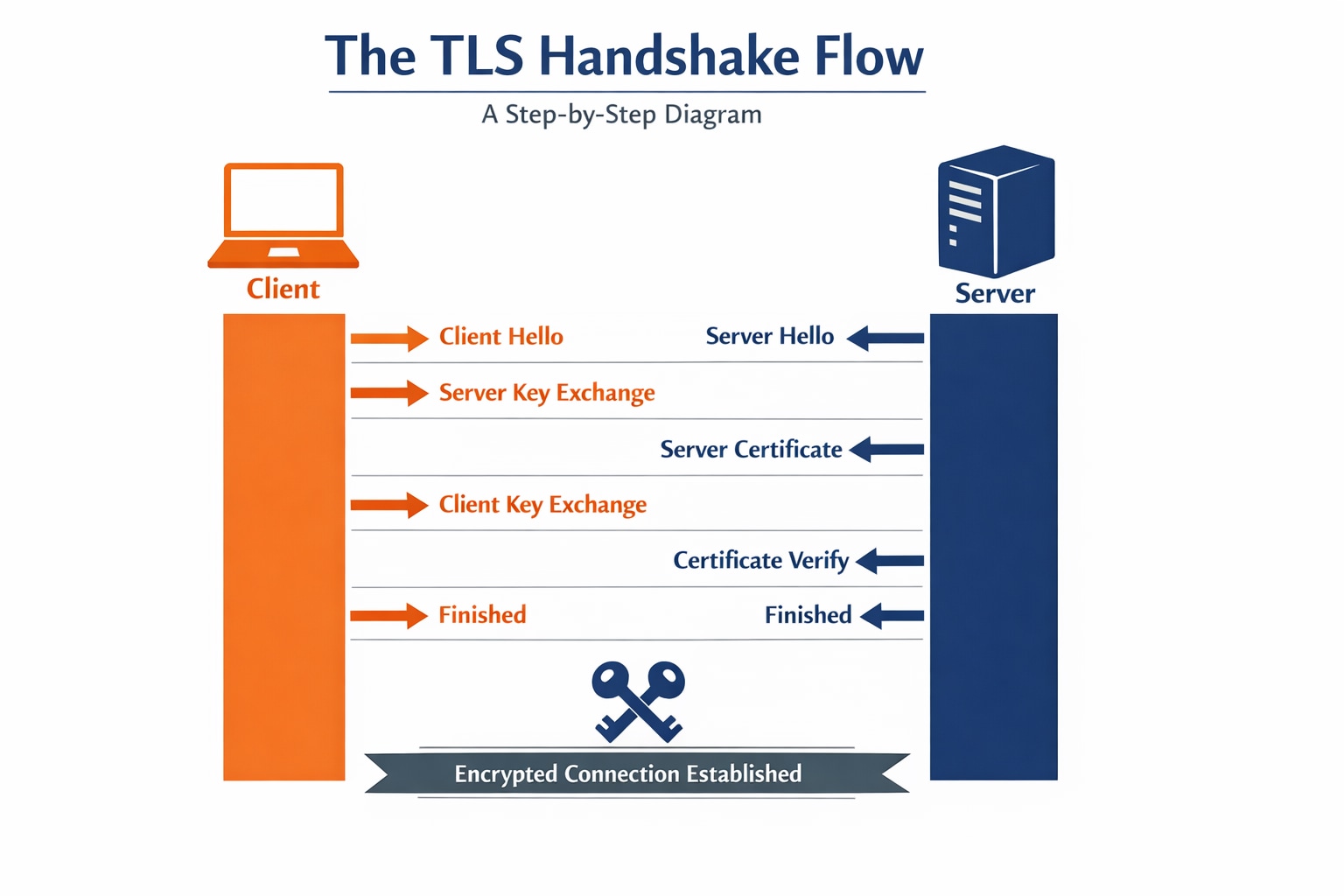
The TLS handshake is the mechanism that allows two parties to agree on encryption keys and verify each other. This happens in milliseconds and involves several steps.
Steps Of The Handshake
- Client Hello: The browser sends supported TLS versions and cipher suites.
- Server Hello: The server chooses the highest common protocol and sends its TLS certificate.
- Authentication: The browser verifies the certificate against its list of trusted CAs.
- Key Exchange: Both parties derive a shared "session key" using Diffie-Hellman key exchange.
- Secure Channel: All subsequent data is encrypted with the agreed-upon symmetric key.
| Handshake Phase | Purpose | Data Involved |
|---|---|---|
| Negotiation | Version Selection | TLS 1.2 or 1.3 |
| Verification | Identity Check | Public Key & Signature |
| Symmetric Setup | Performance | Session Keys |
TLS vs SSL Certificates
While the term "SSL certificate" is still widely used in marketing, the SSL (Secure Sockets Layer) protocol is technically obsolete. TLS (Transport Layer Security) is the modern, more secure successor.
- SSL 3.0 was deprecated in 2015 due to significant vulnerabilities like the POODLE attack.
- TLS 1.3 is the current industry standard, offering faster handshakes and stronger ciphers.
Most certificates work for both protocols; the difference lies in which protocol the server is configured to support. For zero trust architectures, disabling legacy SSL and TLS 1.0/1.1 is a baseline security practice aligned with modern compliance frameworks.
Critical Use Cases For TLS
TLS is no longer just for e-commerce checkout pages. It is pervasive across all digital environments.
Enterprise Applications
- Web Traffic (HTTPS): Protecting public websites from interception.
- API Security: Authenticating communication between microservices.
- VPN Alternatives: Powering zero trust network access (ZTNA) solutions.
- Email Encryption: Securing SMTP and IMAP connections.
Security Functions
- Software Updates: Ensuring patches are signed and haven't been modified.
- IoT Management: Identifying and securing "smart" devices in industrial settings.
TLS Machine Identity Security Best Practices
Managing a handful of certificates is simple; managing thousands across a multi-cloud environment is a challenge. Attackers often exploit expired or "orphaned" certificates to hide their traffic.
5 Pillars Of Certificate Management
- Continuous Discovery: Maintain an automated inventory of every certificate on the network.
- Enforce Policy: Mandate minimum key lengths (e.g., RSA 2048-bit) and short validity periods.
- Automate Renewal: Use protocols like ACME to renew certificates before they expire.
- Monitor For Anomalies: Watch Certificate Transparency logs for unauthorized issuance and flag unexpected certificate usage patterns.
- Least Privilege: Ensure the principle of least privilege applies to the keys protecting these identities.
The Role Of Certificate Authorities
A certificate authority (CA) is a trusted third party, such as DigiCert or Let's Encrypt, that issues TLS certificates. They perform various levels of validation:
- Domain Validation (DV): Simplest form; proves ownership of the domain.
- Organization Validation (OV): Verifies the legal existence of the company.
- Extended Validation (EV): The highest level of vetting. Major browsers no longer display EV distinctly from OV, but the documented identity verification still has value for some compliance and legal contexts.
Following NIST guidelines, organizations should only trust a limited set of CAs to minimize the risk of a "rogue" certificate being used for a Man-in-the-Middle (MitM) attack.
Unit 42 Threat Insights: Certificate Abuse
Unit 42 research has observed that threat actors frequently use valid TLS certificates to mask malicious activity. By using certificates from free CAs, malware can communicate with its Command and Control (C2) server over HTTPS, making it look like legitimate traffic.
Attackers also target private keys. If a private key is exposed due to cloud misconfiguration, an attacker can impersonate the server and decrypt user traffic. This is why identity security must treat certificate private keys as highly sensitive secrets, ideally stored in a hardware security module (HSM).
TLS Certificate FAQs
Public TLS certificate lifetimes are actively shrinking. The current maximum is dropping from 398 days to 200 days in 2026, 100 days in 2027, and 47 days by 2029 per CA/Browser Forum. Some organizations use even shorter spans to reduce the window of opportunity for an attacker if a key is compromised.
A wildcard certificate secures a primary domain and an unlimited number of its subdomains (e.g., *.example.com). While convenient, they increase risk because a single compromised private key can affect multiple services.
No. TLS only protects data in motion. Once the data reaches the server and is decrypted, it must be protected by other means, such as disk encryption or database security.
Browsers will display a prominent security warning to users, often blocking access. In automated systems, expired certificates can cause application outages and broken network segmentation rules.
Yes. TLS 1.3 removes vulnerable legacy ciphers and encrypts more of the handshake. It also supports "0-RTT," which allows for faster reconnection speeds.


