When most people talk about firewall best practices, the conversation sounds familiar: keep firmware up to date, review your rules, block unneeded ports.
Those things still matter. But they don't capture why firewalls fail in environments that already do all of that.
Here's the thing:
The real gaps today aren't about whether you patched last week. They're about complexity. Identity-driven access. AI-generated threats hidden in encrypted traffic. Hybrid networks that stretch across data centers, branches, and cloud.
In other words, best practices in 2025 aren't a checklist. They're a way of applying timeless firewall principles—least privilege, segmentation, monitoring—in architectures that look very different than they did ten years ago.
The sections that follow go deeper. They outline 13 practical firewall best practices that address how modern networks actually work, and how attackers actually move through them.
1. Harden and restrict the management plane
The management plane is the brain of your firewall.
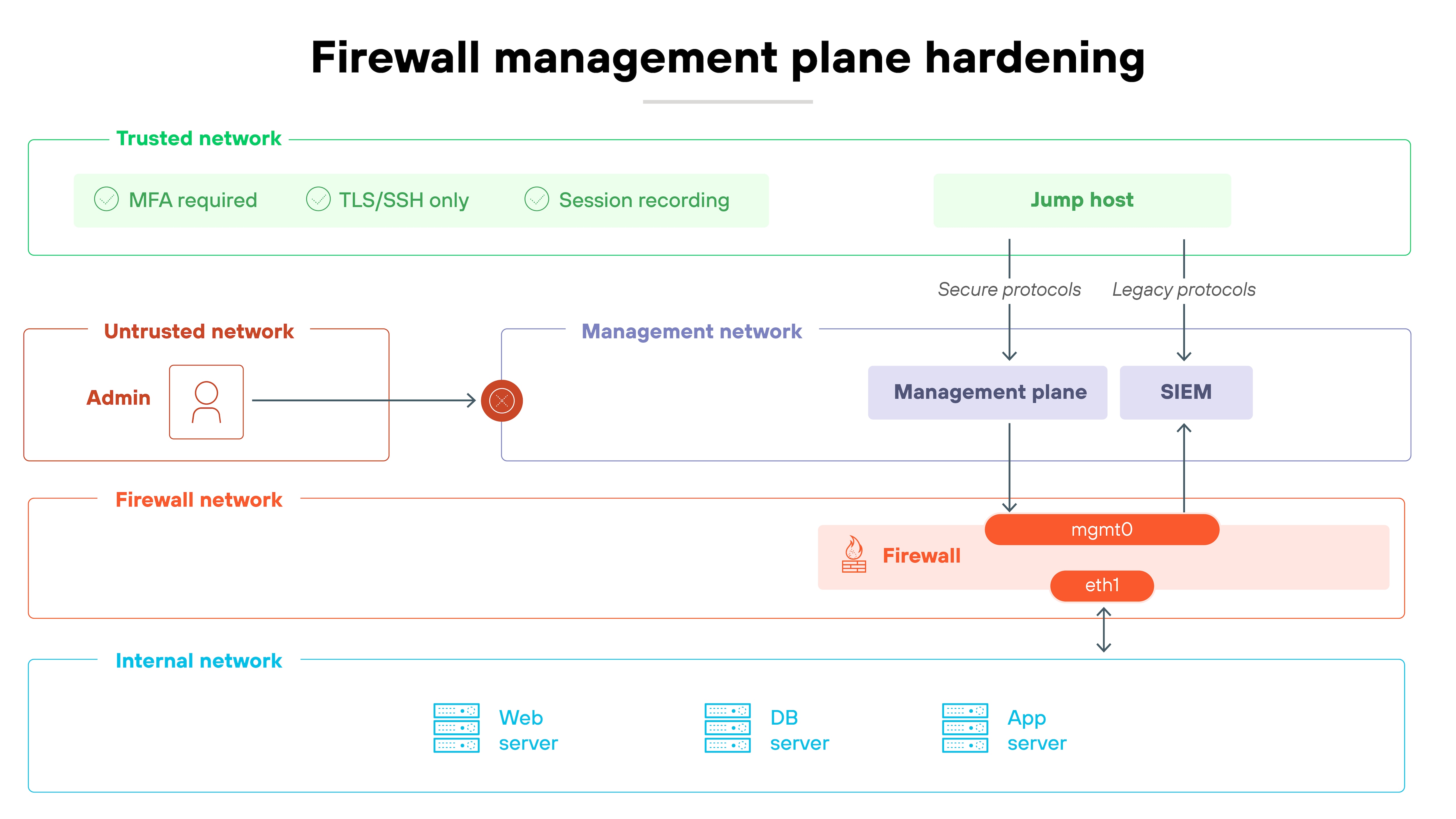
If attackers get in here, they own the whole device. Which means: it has to be locked down tighter than anything else. Start with exposure. Admin interfaces shouldn't be open to every network segment. Restrict them to trusted subnets or, better yet, force access through a jump host.
Strong authentication comes next.
Multi-factor authentication stops account takeover, and role-based access control keeps privileges scoped to what admins actually need. Turn off legacy services like Telnet or SNMPv1 — they send sensitive data in the clear and provide easy entry points. And encrypt all management traffic. SSH and TLS only.
Here's how to confirm that it's working:
Try logging in from an unauthorized segment. You should be blocked. Then check your logs. Every change should show up with a named user and MFA in play. Forward those logs to your SIEM or monitoring system so you can spot unusual activity quickly.
Common pitfalls:
Leaving insecure services enabled for convenience
Sharing admin accounts, which erases accountability
Forgetting to forward management logs to a central system
2. Enforce a default-deny policy with least privilege
The safest firewall policy starts with one principle: block everything by default.
Nothing passes unless it's explicitly required. So every single rule you create should be deliberate, justified, and tied to a real business need.
Historically, firewalls relied on ports and IP addresses. But modern networks are more complex. Applications use dynamic ports, SaaS apps change endpoints, and users connect from everywhere.
That's why policy should be written at the level of application, service, and identity—not just static addresses. A least-privilege model enforces this granularity. Each rule allows only the minimum traffic needed, scoped to specific users, workloads, or groups.
CIS Controls v8.1 states that automated tools should be used to review firewall and ACL rule sets. These checks help identify conflicts, errors, or unintended access, ensuring rules align with policy and don't permit traffic that should remain blocked.
How can you validate it?
Start by reviewing active rules. Every permit entry should map to a documented requirement. Test rules by attempting connections outside of what's allowed. They should fail. Then validate logs. Allowed traffic should show only what's expected, tied to named identities or services.
Tip:
Automate least-privilege validation as part of configuration reviews. Using policy-analysis tools to simulate traffic flows before deployment ensures new rules don't unintentionally expand access or create conflicts.
Common pitfalls:
Allowing broad “any-any” rules for convenience
Using only IP/port controls instead of application or identity context
Letting temporary exceptions become permanent rules
A firewall ruleset is only effective if it stays manageable and accurate.
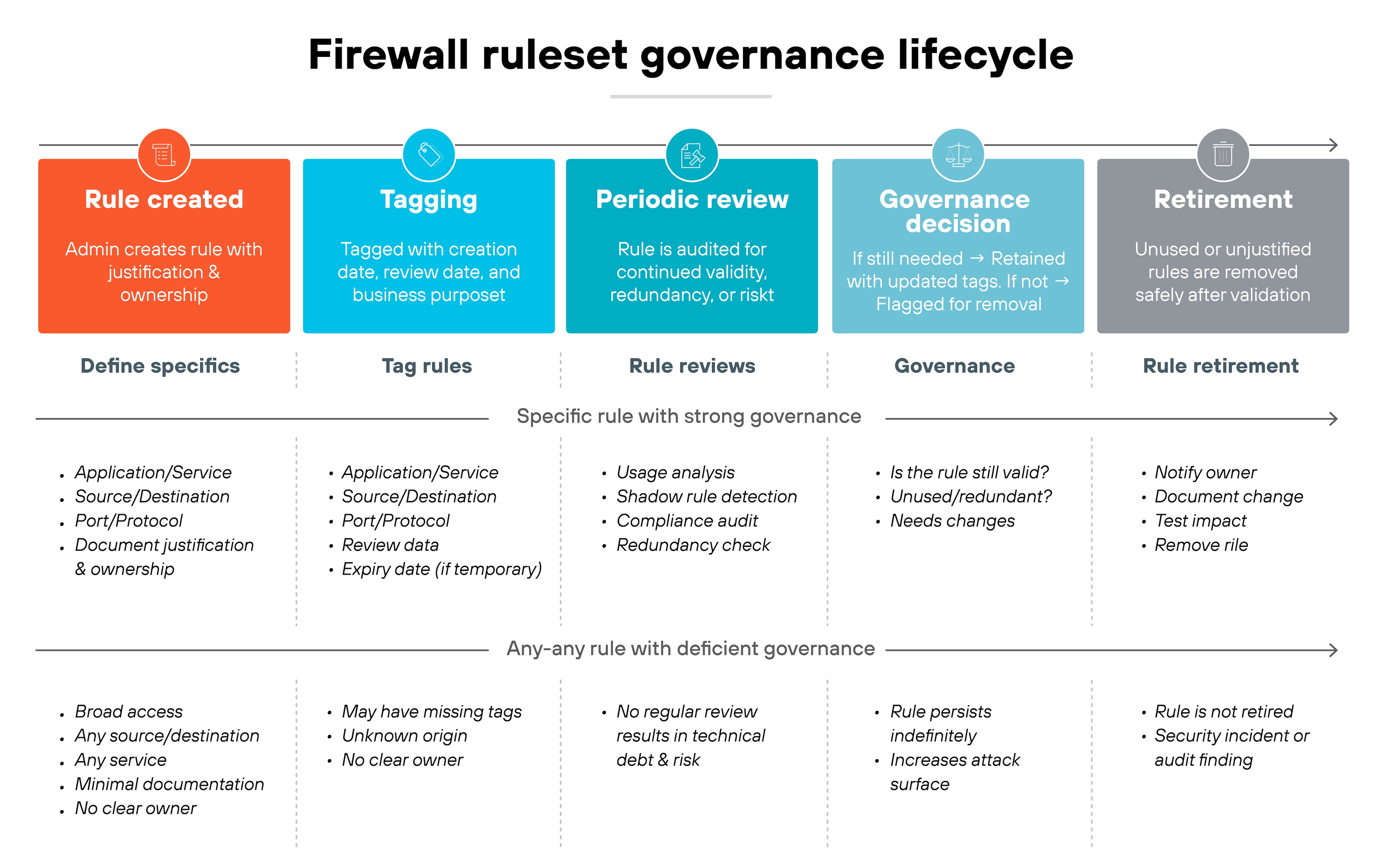
As mentioned in the previous section, every rule should exist for a reason, have an owner, and be tied to a documented business requirement. Rules without clear justification become liabilities over time.
Good governance starts with avoiding broad, open-ended policies.
“Any-any” rules are tempting because they resolve issues quickly. But they also open the door to unnecessary risk. Instead, rules should be as specific as possible—by application, service, or user group. Lifecycle tagging helps here. Tags make it easier to track when rules were created, who approved them, and when they need review.
Ongoing checks are a must.
So review rulesets regularly to identify entries that are unused, redundant, or shadowed by other rules. Test changes in a controlled way to confirm they behave as intended. Audits should check that every rule can be traced back to a valid business case, and that exceptions are temporary and tracked.
Common pitfalls:
Leaving unused or expired rules in place indefinitely
Allowing “any-any” rules for convenience
Failing to assign ownership, so rules persist without accountability
A firewall rule that allows traffic shouldn't be the end of the story.
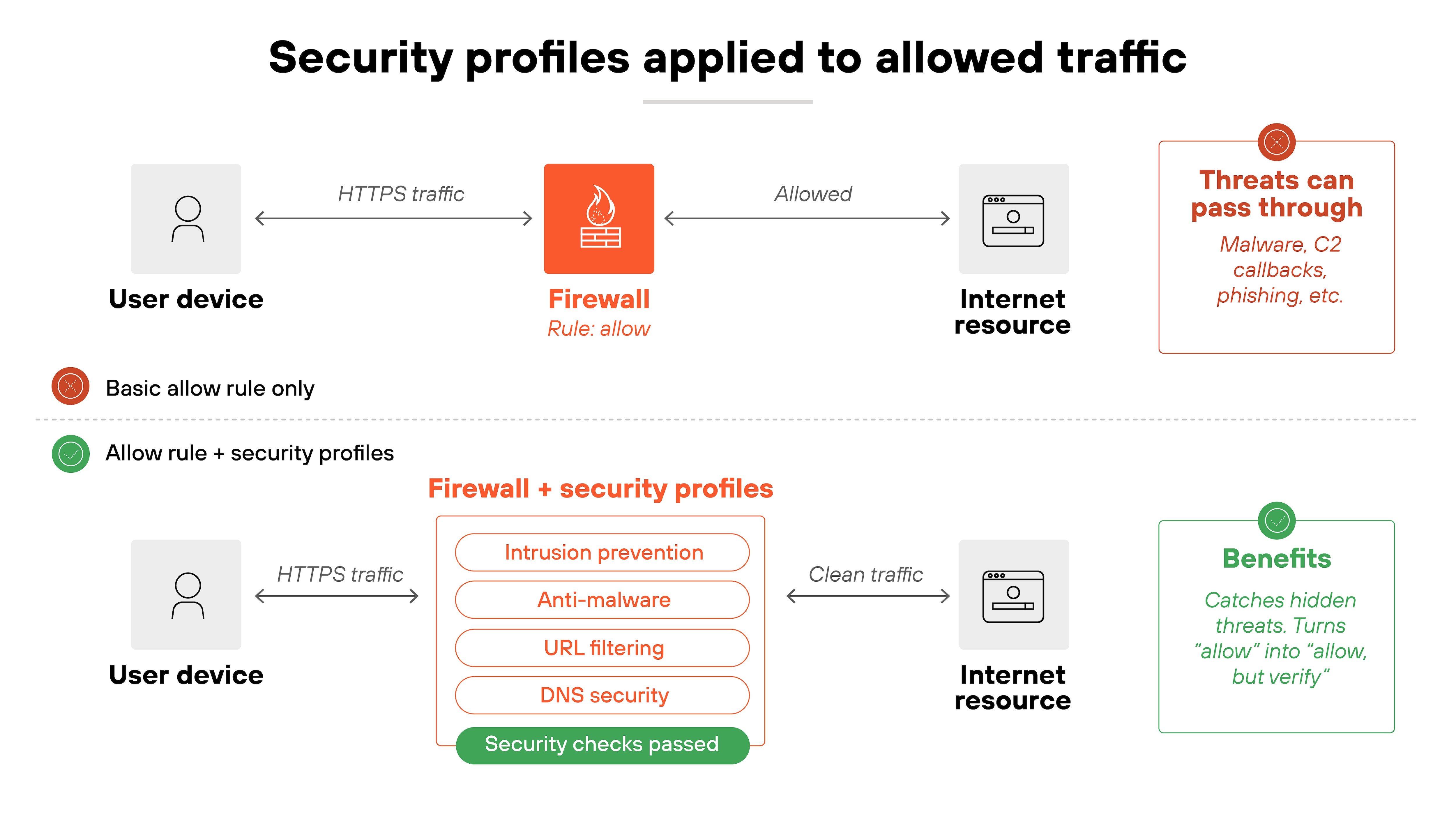
Even approved traffic has to be inspected for threats. Otherwise, attackers can ride along inside connections you've already decided to trust.
That's where security profiles come in. They extend firewall rules by attaching deeper inspection capabilities. Examples include intrusion prevention, anti-malware, URL filtering, and DNS protection.
These controls catch threats hidden in allowed flows—like malicious files sent over HTTPS, command-and-control callbacks using DNS, or phishing sites reached over standard web ports.
Profiles turn a simple “allow” into “allow, but check carefully.”
How do you make sure this works?
Start by confirming that every allow rule has an attached profile. Then test those profiles. For instance, try resolving known test domains or uploading safe malware samples in a controlled lab. The firewall should flag or block them. Logs should also show detections tied to the specific rule and user identity.
Common pitfalls:
Allowing traffic without attaching inspection profiles
Using outdated signatures or rules in IPS/anti-malware engines
Leaving exceptions in place that bypass inspection entirely
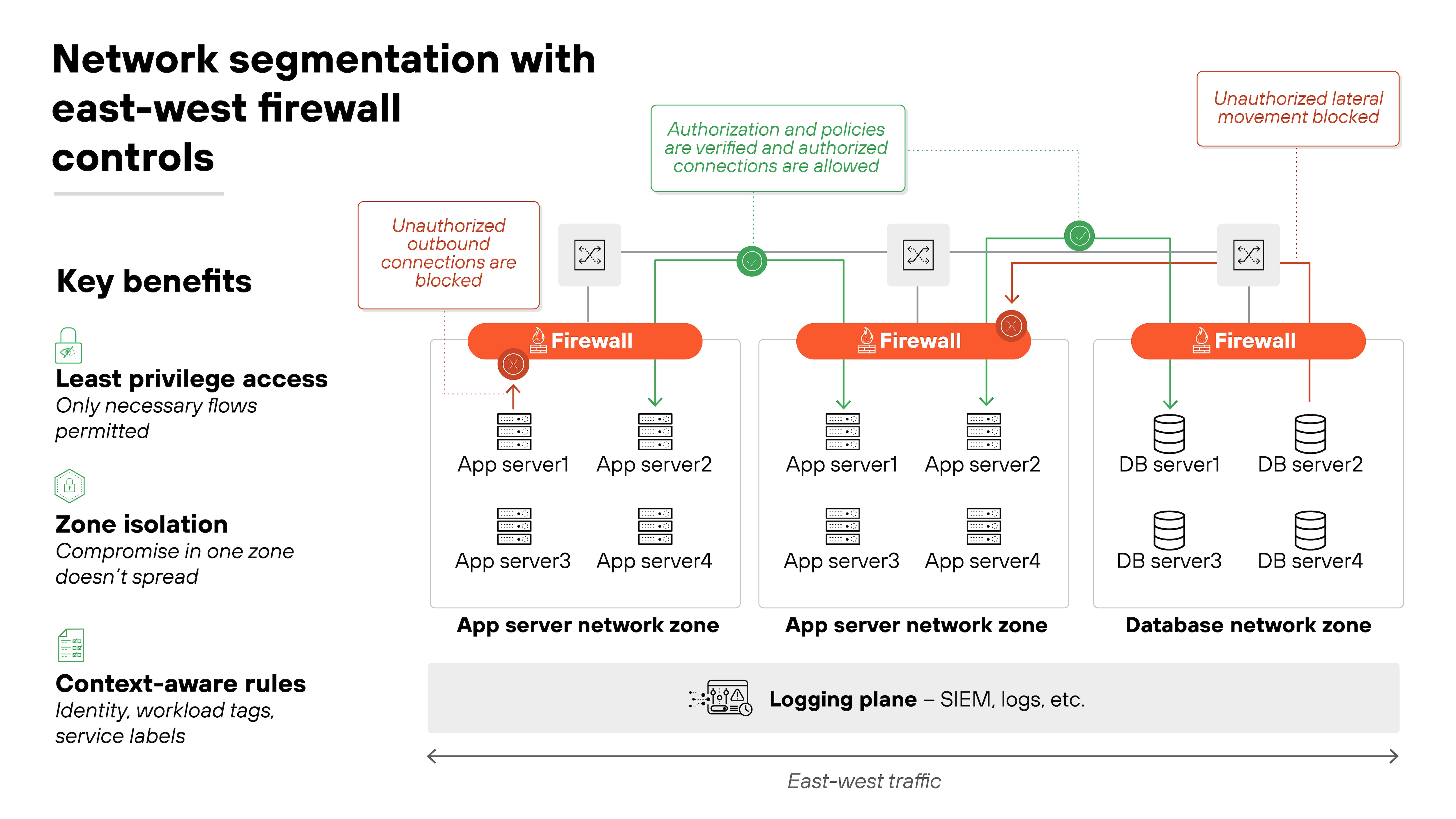
5. Segment networks and enforce east-west controls
Firewalls aren't just for the perimeter anymore.
Once an attacker gets inside, lateral movement is often what leads to serious damage. That's why segmenting networks and controlling east-west traffic is just as important as managing north-south flows.
Segmentation starts with zones. Users, servers, SaaS connections, and sensitive workloads should all be in distinct network segments.
Microsegmentation takes it further by isolating workloads inside data centers and cloud environments. Each segment gets its own firewall rules, so compromise in one zone doesn't mean compromise everywhere.
The policy for these internal flows should still follow least privilege.
East-west rules should allow only what's explicitly needed between segments. For example, an application server may need to reach a database, but that doesn't mean it should connect freely to every system in the data center. Context such as identity, workload tags, or service labels makes this enforcement more precise.
Segmentation only matters if it's enforced. So you'll need to confirm it's doing its job.
Test by attempting disallowed connections between zones or workloads. They should fail. Review flow logs to ensure traffic is only passing along intended paths. Microsegmentation tools and SIEM integration can help verify that policies are working as written.
Common pitfalls:
Relying only on perimeter firewalls while leaving east-west traffic unrestricted
Creating segments but failing to enforce least-privilege rules between them
Not updating segmentation as new cloud workloads or services are added
6. Implement TLS decryption with clear exception handling
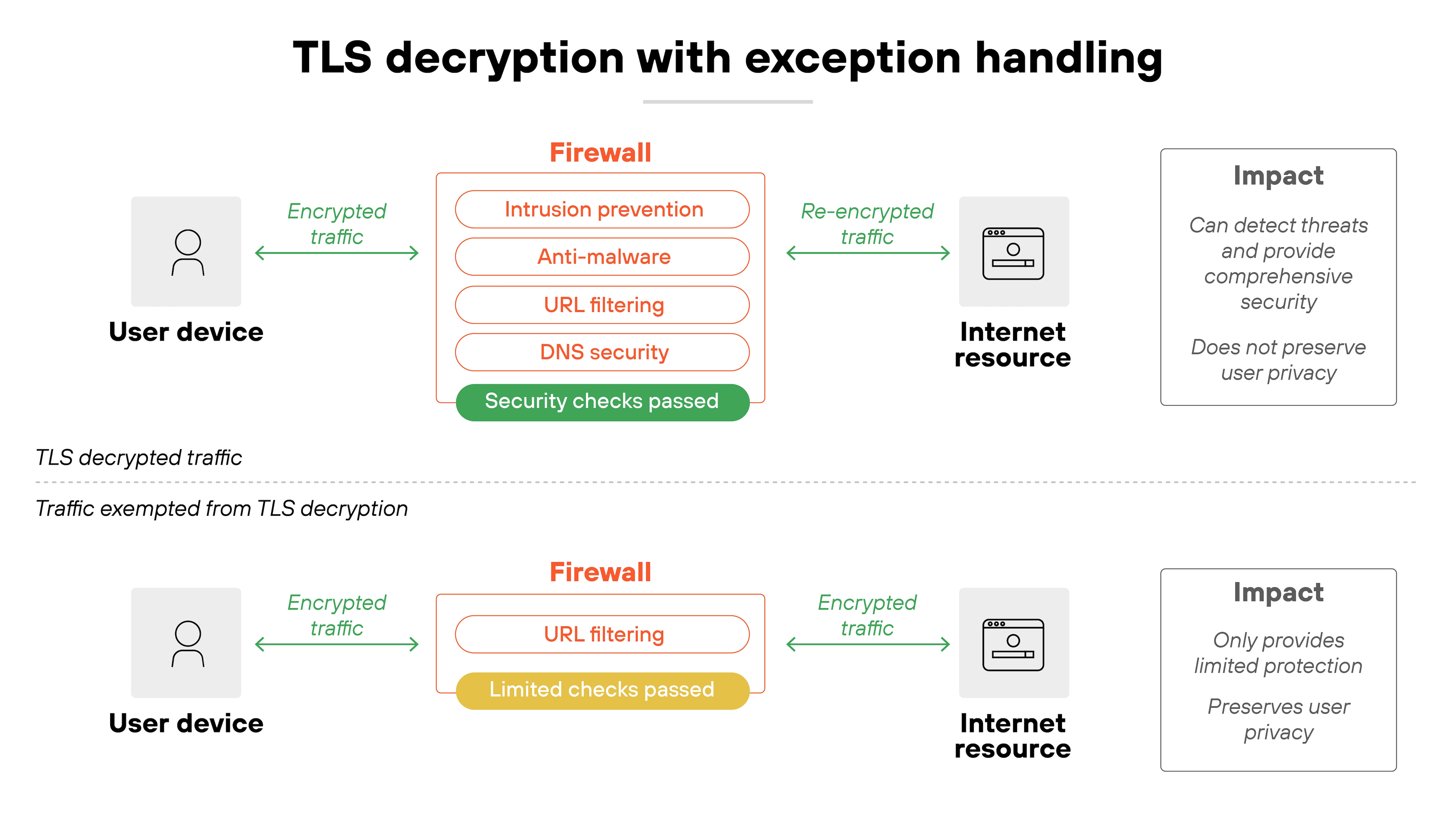
Most internet traffic is encrypted. That's good for privacy but bad for security visibility. That's why attackers can hide inside TLS sessions if your firewall isn't decrypting traffic.
To prevent that, modern firewalls should decrypt both outbound and inbound flows wherever feasible. That way, intrusion prevention, anti-malware, and URL filtering engines can actually see what's inside.
Where do you start?
Establish policies for SSL/TLS inspection on high-risk protocols like HTTPS, SMTP over TLS, and DNS over HTTPS. Make sure certificates are validated and re-signed so users don't see broken trust warnings. And build in performance planning. Decryption is CPU-intensive, so capacity matters.
But not every flow should be decrypted.
Some traffic is privacy-sensitive or technically incompatible with inspection. Like banking sessions, healthcare portals, and certain modern apps that break if SSL interception is applied. That's where exception lists come in. Define them clearly, review them often, and document the business justification for each entry.
Don't forget to check that it's working.
Test with known TLS-encrypted malicious samples in a controlled lab. Your firewall should detect and log the threat after decryption. Also check that exception rules only cover what they're supposed to. Overly broad exemptions defeat the purpose of inspection.
Common pitfalls:
Allowing blanket exceptions for entire domains instead of specific services
Failing to size hardware or licenses to handle decryption load
Not reviewing exceptions, leading to “temporary” bypasses that become permanent
7. Control egress traffic as strictly as ingress
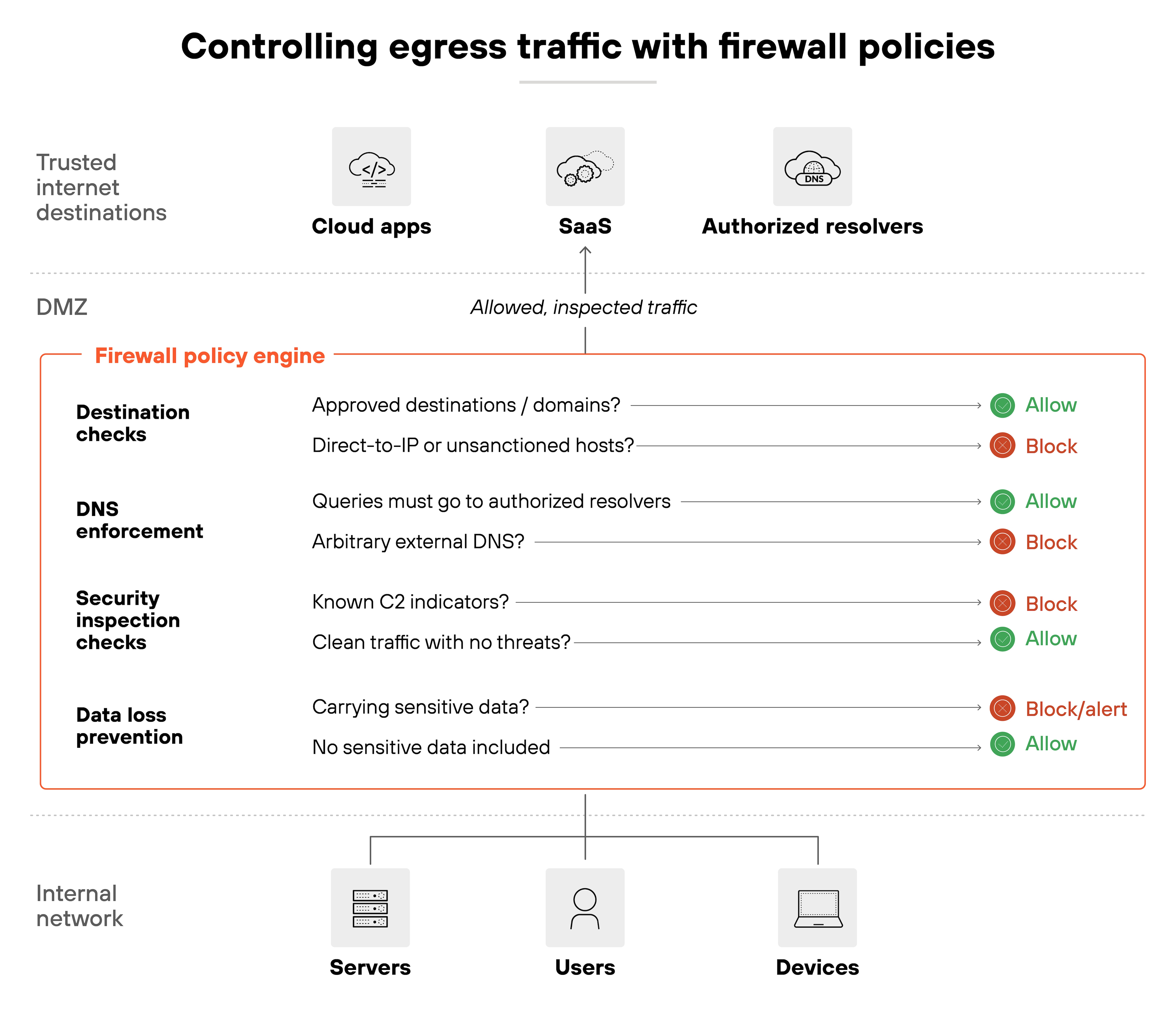
Firewalls are often seen as protecting the network from the outside. But outbound traffic can be just as risky. Every connection leaving your network should be subject to the same scrutiny as traffic coming in.
The principle is simple. Only allow outbound traffic to approved destinations and services.
That includes enforcing DNS queries through authorized resolvers so attackers can't hijack resolution with their own servers. It also means preventing direct-to-IP connections or outbound traffic that looks unusual for the business. Country anomalies, for example, can be an early warning sign of command-and-control activity.
Outbound controls only count if they hold up in practice.
Start by testing outbound connections to unauthorized domains or IPs—they should fail. Review firewall and DNS logs to confirm traffic is routed only through sanctioned resolvers. Anomalous attempts, like traffic heading to unexpected regions, should trigger alerts.
Common pitfalls:
Allowing unrestricted outbound internet access by default
Letting endpoints use arbitrary DNS resolvers instead of approved ones
Ignoring egress anomalies that indicate data exfiltration or malware callbacks
8. Monitor, log, and alert with action in mind
Monitoring and logging are at the core of firewall operations.
They provide visibility into what the firewall is doing, how it's being used, and when something unusual occurs. Without this visibility, you can't validate whether firewall policies are effective—or if someone has tried to alter them.
CIS Controls v8.1 recommends that organizations should collect logs from key assets like firewalls, store and protect those logs securely, and define retention and review policies to ensure they provide useful evidence for both operations and incident response.
Logs shouldn't stay on the device.
Forward them to a centralized system such as a SIEM or UEBA platform. That way, firewall data can be correlated with events across the rest of the environment. It helps detect attacks, misuse, or misconfiguration that wouldn't be visible in isolation.
Retention and integrity also matter.
Logs should be stored securely for the period required by your compliance framework. Protect them from tampering so they can be trusted as an audit trail. Regular reviews, not just real-time alerts, help identify trends and recurring issues.
Tuning alerts is critical.
Too many create noise. The focus should be on meaningful events such as administrative changes, disabled policies, or traffic patterns that break from the norm. Alerts only help if response is practiced. So build workflows in advance, assign ownership, and rehearse escalation so action follows quickly.
Tip:
Automate correlation between firewall logs and identity data. Linking events to specific users or devices—rather than just IPs—improves investigation speed and accuracy.
Common pitfalls:
Keeping logs only on the firewall instead of forwarding them
Allowing alert fatigue to obscure critical events
Neglecting log retention or failing to validate log integrity
9. Patch, update, and validate firewall software and signatures
Firewalls are only as strong as their software and signatures.
If they aren't current, they're vulnerable. Firmware, operating systems, and security signatures all need regular updates. These updates close known gaps and keep inspection engines aware of new attack techniques.
CIS Controls v8 emphasizes a defined process for keeping software and firmware current, supported by automated patch management and update tools to ensure operating systems and applications stay up to date across the enterprise.
But applying patches blindly can be risky.
Updates may introduce compatibility issues or even cause outages if deployed straight into production. So the safer path is controlled staging. Test updates in a lab or lower-tier environment before applying them across the board. That way, you confirm functionality and performance before users are affected.
Don't forget: validation is just as important as installation.
After an update, check that firewall protections are active and working as intended. For example, run test traffic against new IPS signatures or URL filtering categories. Logs should clearly show detections tied to the updated components. Without validation, you're assuming security that may not actually be in place.
Tip:
Integrate patch validation into your change management process. Automatically trigger functional and security tests after each update to confirm the firewall's inspection engines and policies still behave as expected.
Common pitfalls:
Delaying updates until vulnerabilities are exploited in the wild
Applying patches without testing in a controlled environment
Assuming protections are live after an update without verifying
10. Ensure resilience with high availability and tested backups
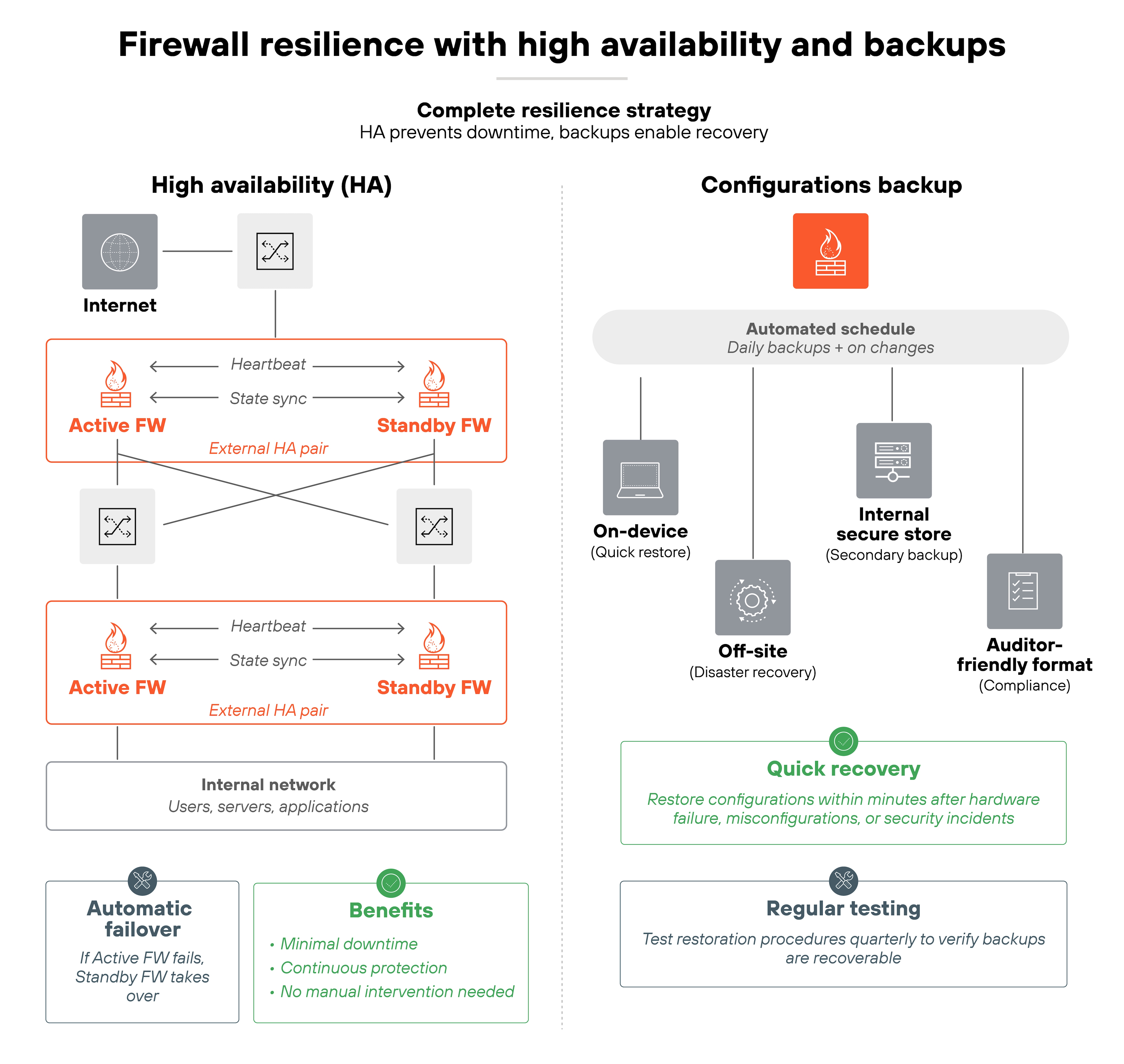
Firewalls are mission-critical. If they go down, the network can be left exposed or disconnected. So resilience isn't optional. The way to achieve it is through high availability and reliable backups.
Start with HA (high availability).
Deploy firewalls in pairs or clusters so that if one fails, another takes over automatically. This reduces downtime and keeps security controls in place.
But HA isn't a one-time setup. So failover should be tested regularly to confirm it actually works. Network changes, patches, or routing updates can all break failover if you don't verify.
Backups are the second piece.
Firewall configurations and policies should be backed up on a regular schedule. Those backups should be tested, not just stored, to make sure they can be restored quickly when needed. Keeping copies in both system-readable and auditor-friendly formats ensures they're useful for both recovery and compliance.
Common pitfalls:
Setting up HA but never testing failover in real conditions
Keeping backups but failing to verify they can be restored
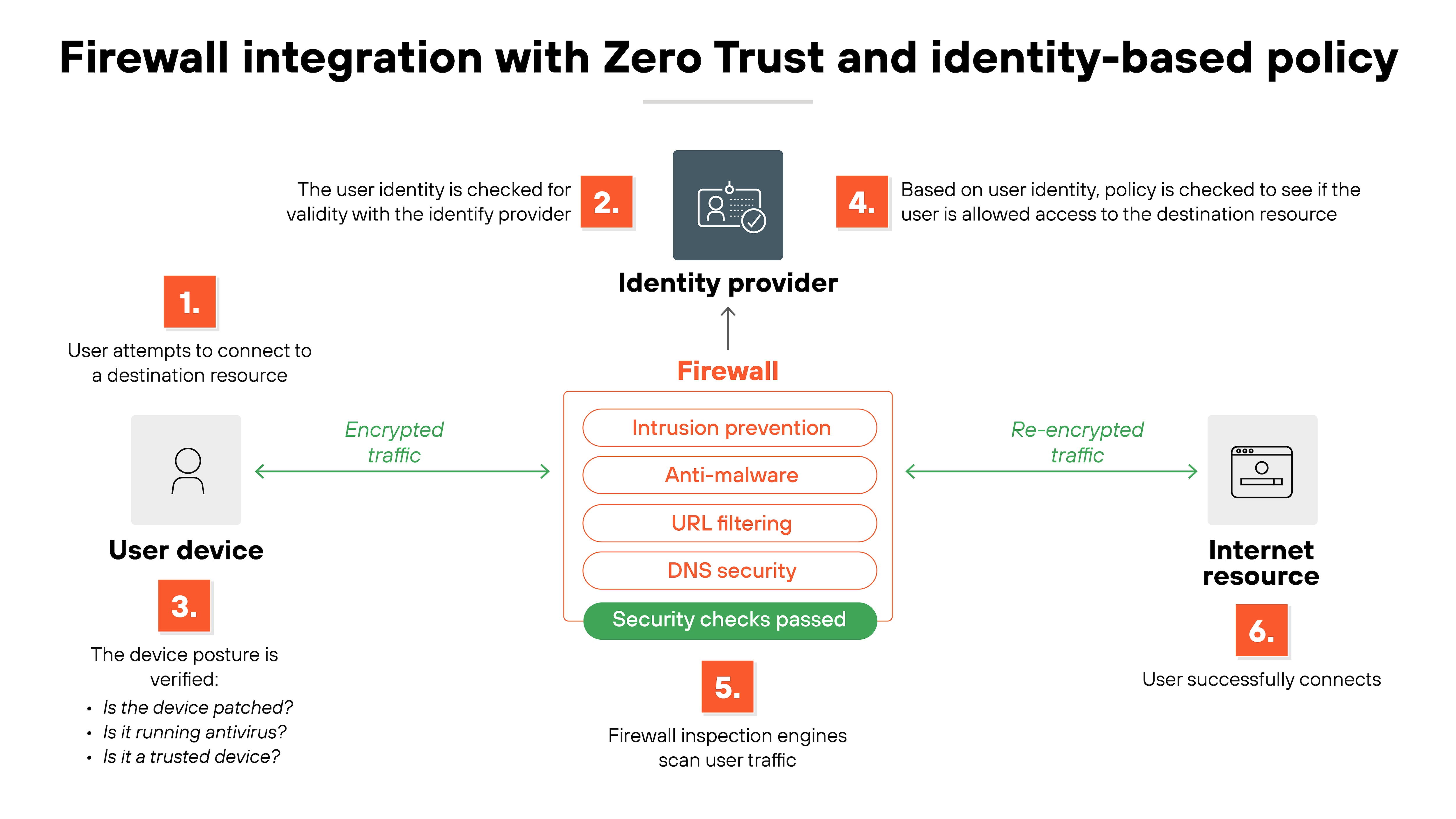
11. Integrate firewalls into Zero Trust and identity-based policy
Traditional firewalls enforced access mainly through static attributes like IP addresses or network zones. That worked in perimeter-driven models but falls short in modern, hybrid environments. Firewalls now need to participate in Zero Trust.
Zero Trust shifts the focus from location to identity.
Access is tied to who the user is, what device they're on, and whether both meet defined posture requirements. For firewalls, this translates into enforcing policies that reference user accounts, device health, and session context—not just a source IP.
On the other hand, access cannot be a one-time check.
Zero Trust emphasizes continuous evaluation. Firewalls should support dynamic policy decisions, drawing on identity providers, endpoint posture checks, and behavioral analytics. That way, a session is only permitted as long as confidence in the user and device remains high.
Practical implementation involves integrating firewalls with identity services and policy engines. For instance, tying rules to groups in Active Directory or cloud identity platforms. Or checking device certificates before allowing application access. This ensures least-privilege enforcement extends across east-west and north-south flows.
Common pitfalls:
Relying only on static attributes like IP addresses while calling it Zero Trust
Failing to integrate firewalls with identity providers or policy engines
Treating identity checks as one-time events instead of continuous
12. Regularly test and audit firewall effectiveness
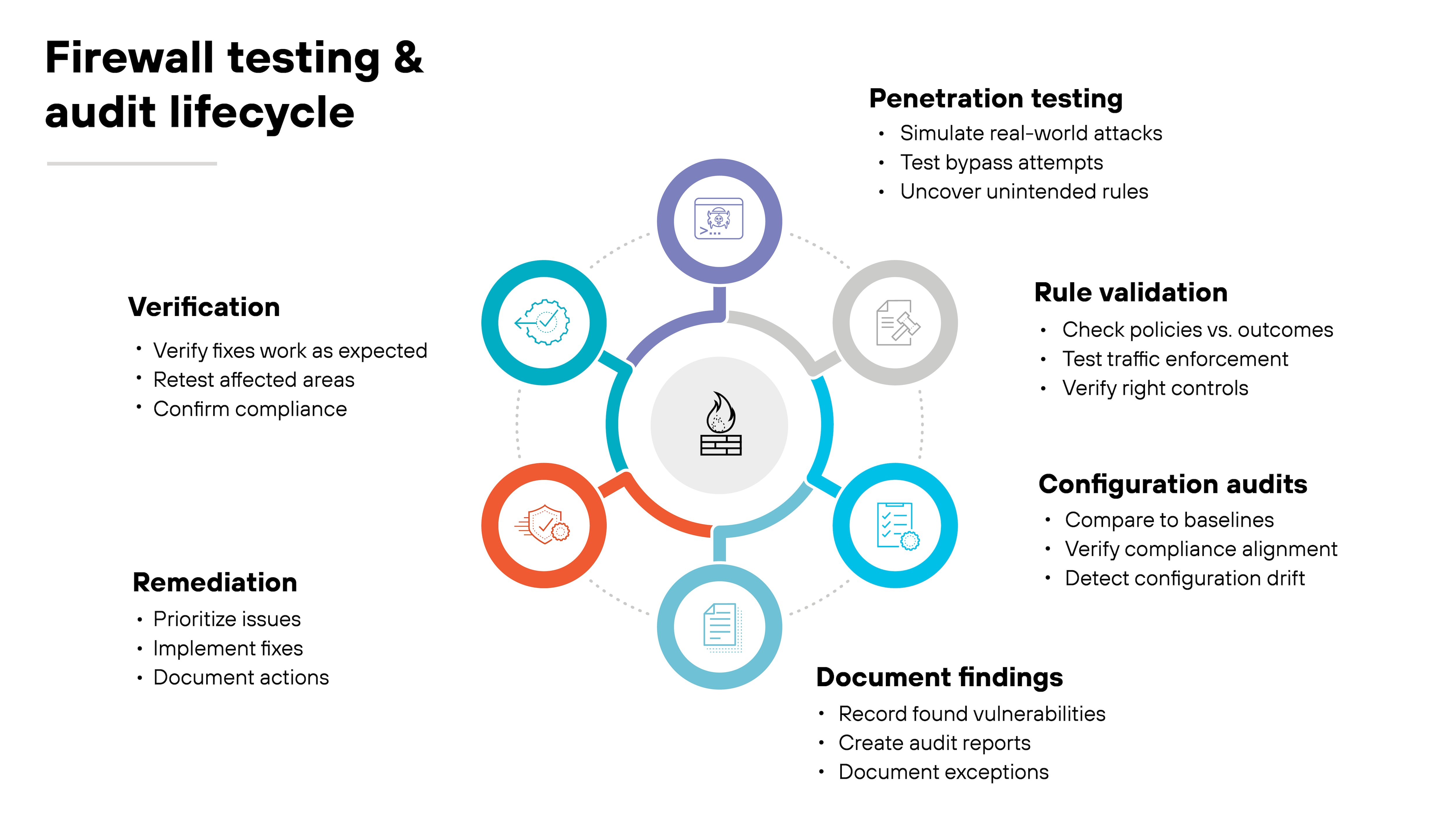
A firewall rulebase looks solid on paper. But unless you test it, you don't really know if it's working as intended. Validation has to be a recurring part of firewall management, not a one-time setup exercise.
Start with penetration testing.
Controlled attempts to bypass firewall policies can uncover overlooked gaps—like an unintended rule that still allows risky traffic. Pair that with rule validation. Every policy should be checked against its intended outcome to confirm it enforces the right controls.
Configuration audits are just as important.
For example, compare your settings against compliance requirements or internal baselines. That ensures you're not just secure in theory, but also aligned with regulatory obligations. Audits also catch drift, where small changes accumulate into bigger problems.
Important: testing only matters if results drive action.
Findings should feed into documented remediation steps, and fixes should be verified after implementation. Regular audits also provide evidence for regulators and auditors, proving that controls are active and enforced.
Common pitfalls:
Treating testing as a one-off project instead of a continuous process
Running audits without following up on findings
Skipping validation of old or shadowed rules that still affect traffic
13. Adapt practices for specific environments (cloud, branch, containers)
Not every firewall deployment looks the same. Best practices need to adapt to the environment you're protecting. The controls stay consistent, but how you apply them shifts depending on cloud, branch, or containerized workloads.
Note:
Cloud and container firewalls often process tens of thousands of short-lived connections every second, most lasting only milliseconds. It's one reason traditional rule management models don't translate cleanly across environments built for constant change.
Start with cloud and IaaS.
Static IPs don't scale when workloads spin up and down. Instead, use dynamic address groups tied to tags or metadata. Combine that with transit firewalls integrated into VPC or VNet routing so traffic between cloud segments always passes through inspection points. Verification is simple: review flow logs and confirm that traffic between virtual networks consistently hits the firewall.
At the branch level, SD-WAN complicates things if each site breaks out locally to the internet.
The fix is central policy management. Enforce rules from one place, but give branches the ability to control local breakout traffic so it's filtered with the same standards as headquarters. Test this by simulating traffic at a branch and checking that logs reflect the same policy outcomes you'd expect at the core.
Containers and Kubernetes bring their own twist.
Pods and services move constantly, so IP-based rules fall apart. The alternative is to use workload labels and service identities. Policies then follow the workload, not the network location. For example: limit east-west traffic between namespaces or restrict services by identity. You can verify by redeploying pods and confirming that the same security policies still apply.
Tip:
Standardize firewall policy intent across environments. Whether it's a VPC, branch, or Kubernetes cluster, define policies in a single framework (like infrastructure as code or policy-as-code). This makes security portable, auditable, and consistent. No matter where the controls live.
Common pitfalls:
Treating all environments with the same static rules
Ignoring dynamic metadata and relying on IPs that change frequently
Allowing SD-WAN branches to bypass central policy enforcement
Place more specific rules above broader ones, deny rules above allow rules where appropriate, and avoid “any-any” entries. This ensures intended controls take precedence and reduces the risk of shadowed or unused rules.
An ideal configuration follows default-deny, enforces least privilege, applies inspection profiles to permitted traffic, and aligns with business and compliance requirements. It should be documented, tested, and validated regularly to confirm effectiveness.
Forward logs to a centralized SIEM or UEBA, protect them from tampering, retain them for required periods, and tune alerts for actionable events. Regular reviews help detect anomalies and validate policy enforcement.
Apply default-deny with least privilege, and require documented justification for each rule. Together, these reduce unnecessary exposure and ensure every rule aligns with business needs.
Essential elements include rule ownership, access justification, default-deny posture, inspection profiles, logging requirements, review schedules, and compliance alignment. These ensure policies remain enforceable, auditable, and effective.
Rules should be reviewed at least quarterly, or more frequently in dynamic environments. Reviews confirm necessity, remove unused or shadowed entries, and ensure compliance alignment.
Restrict outbound traffic to approved destinations, enforce DNS through authorized resolvers, and monitor for anomalies such as direct-to-IP or geographic outliers. This prevents misuse and helps detect command-and-control activity.